15 Facebook Metrics To Track For Smarter Decision Making
There are dozens of Facebook metrics to track — but only a few actually matter. Here's how to track and use them to make smarter decisions.


Facebook gives you access to more analytics than you'll ever need. Reach, views, engagement rate, CTR, CPM — and the list goes on. And yet, most social media leaders still walk into executive meetings unsure whether the numbers they're presenting actually tell the right story.
From my perspective, the issue isn't a lack of data. It's a lack of clarity on what to track and why. Once you understand what each metric is really measuring — and how it connects to your goals — the dashboard stops feeling overwhelming and starts feeling useful.
In this guide, I've broken down the Facebook metrics that are worth your attention — what they measure, when to track them, and how to use them to make better decisions.
Key takeaways
-
What types of Facebook metrics should you track?
You don't need to track everything — just the metrics that align with your current goals, whether that's building awareness, growing your audience, or driving conversions. -
What are the main Facebook metrics categories that will help you make informed decisions? Facebook metrics fall into distinct categories — reach, audience, engagement, conversion, and video — and knowing which category serves which goal is what makes your tracking intentional rather than reactive.
-
How does Socialinsider consolidate in-depth Facebook metrics tracking? Instead of piecing together data from multiple native tools, Socialinsider brings your performance metrics, competitor benchmarks, content pillar analysis, and organic value into one place — automatically.
-
How to turn the metrics into business insights? Numbers only become useful when they're tied to a goal, read in context, and acted on quickly — that's what separates reporting from strategy.
What types of Facebook metrics should you track?
Facebook metrics can be too much when you're staring at the Meta Business Suite dashboard full of numbers.
But the good thing is, you don’t need to track all the social media metrics simultaneously. Just the ones that fit your current goals.
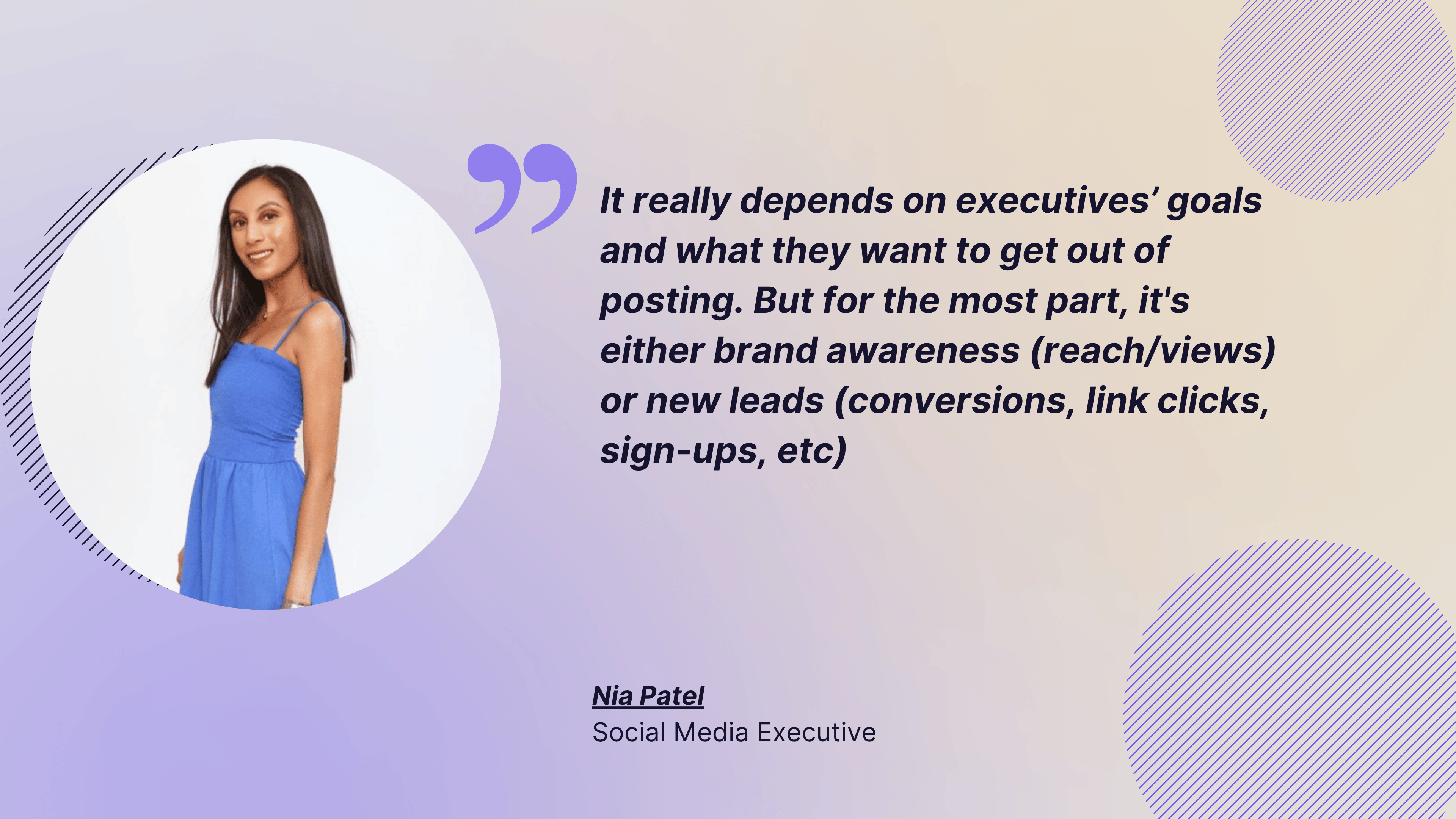
Here's what Nia Patel, Strategic Operations Lead at Prolific Voices, told me when I asked her about the most important metrics for her when reporting to executives:
It really depends on executives’ goals and what they want to get out of posting. But for the most part, it's either brand awareness (reach/views) or new leads (conversions, link clicks, sign-ups, etc).
And I agree — it totally depends on the goals. When you’re choosing the metrics you want to track, focus on those that follow your specific buyer journey and fit your current objectives.
For example, if your goal right now is brand awareness, your core metrics would be reach, views, and follower count. But if your focus is on conversions and the bottom of the funnel, you’ll care more about engagement rate, click-through rate, and link clicks.
What are the main Facebook metrics categories that will help you make informed decisions?
You can divide the Facebook metrics into several main categories based on what they're tracking. These categories align with different goals and stages of your customer journey.
Understanding these categories helps you navigate faster and choose what to track based on what you're trying to achieve.
Let’s break down the core categories of Facebook metrics:
Facebook reach and visibility metrics
These metrics tell you how visible your content is: who's seeing it and how often. They're your first line of insight into whether your Facebook content is making it in front of people.
#1. Reach
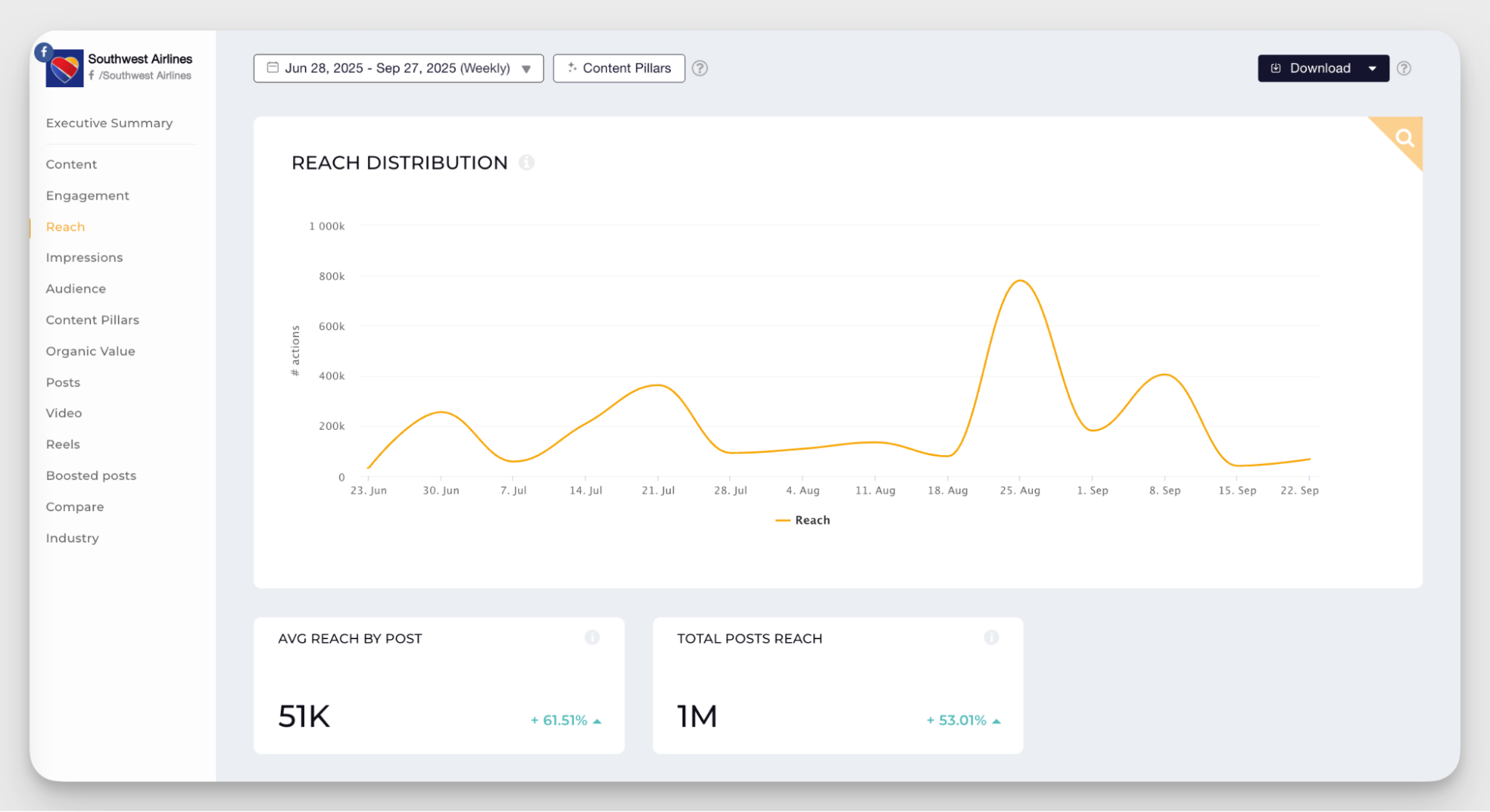
The reach metric represents the number of unique individual accounts that saw your content at least once during a given period.
Personally, I pay close attention to reach especially when running brand awareness campaigns. If I'm trying to introduce a brand to new people, I need to know how many individuals actually saw it compared to before the campaign started. Did we expand our footprint, or are we just talking to the same crowd?
One thing to keep in mind: many platforms — Facebook included — estimate reach rather than track it exactly. The numbers can shift slightly over time as the platform refines its calculations.
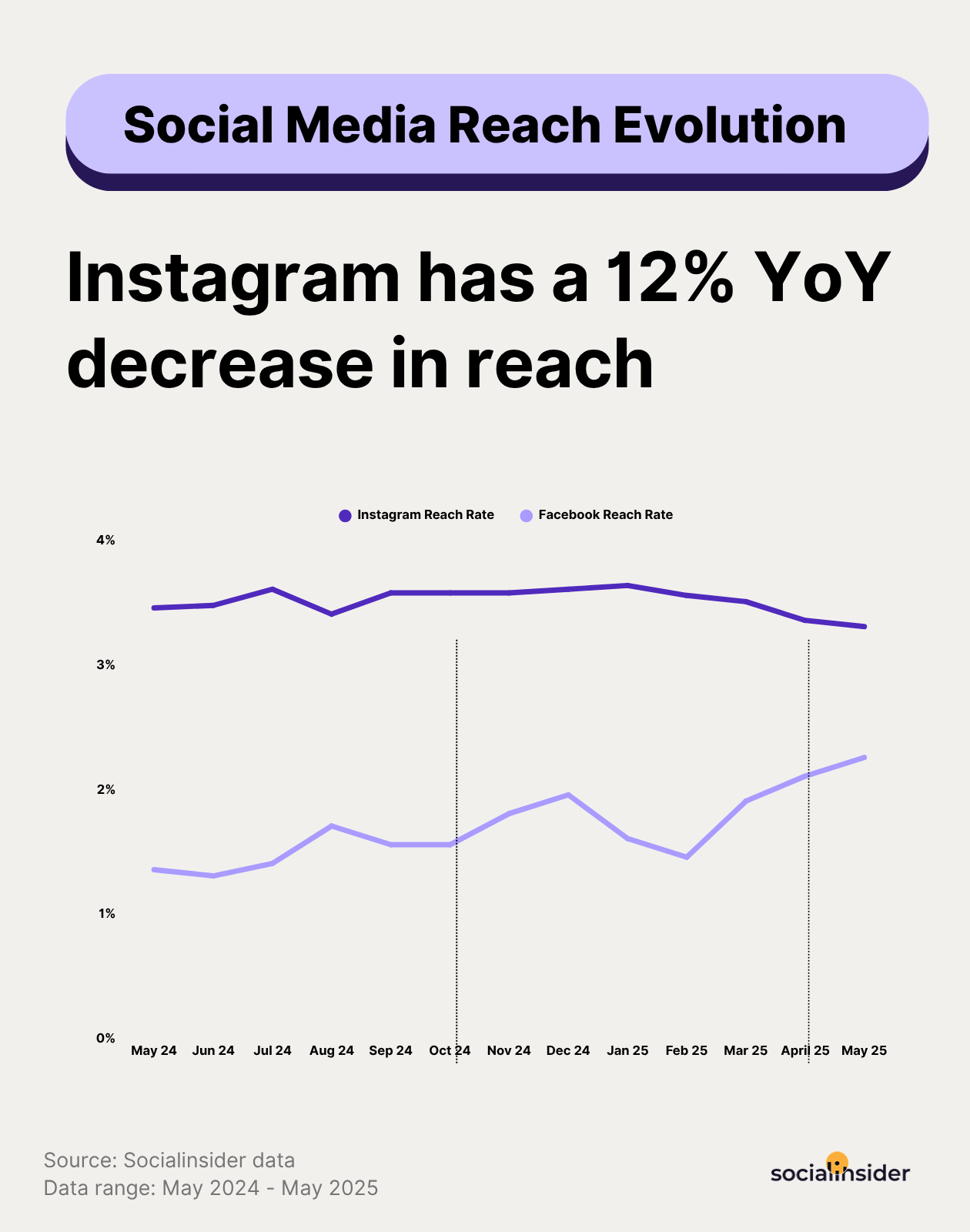
And since reach discussions are all over the internet, given social platform's tendencies to reduce exposure over time, here's something you should know: according to Socialinsier's reach data, Facebook's average reach rate at the moment stands at 1.65%. Just to add more context to your own numbers when reporting to executives about this.
#2. Views
Views on Facebook measure how many times your content was seen in total. If the same person scrolled past your post twice, that counts as two views. It's the same concept as what Facebook used to call impressions — Meta rebranded the metric to "views" in 2025 to align the language across its platforms and make it feel more intuitive for creators.
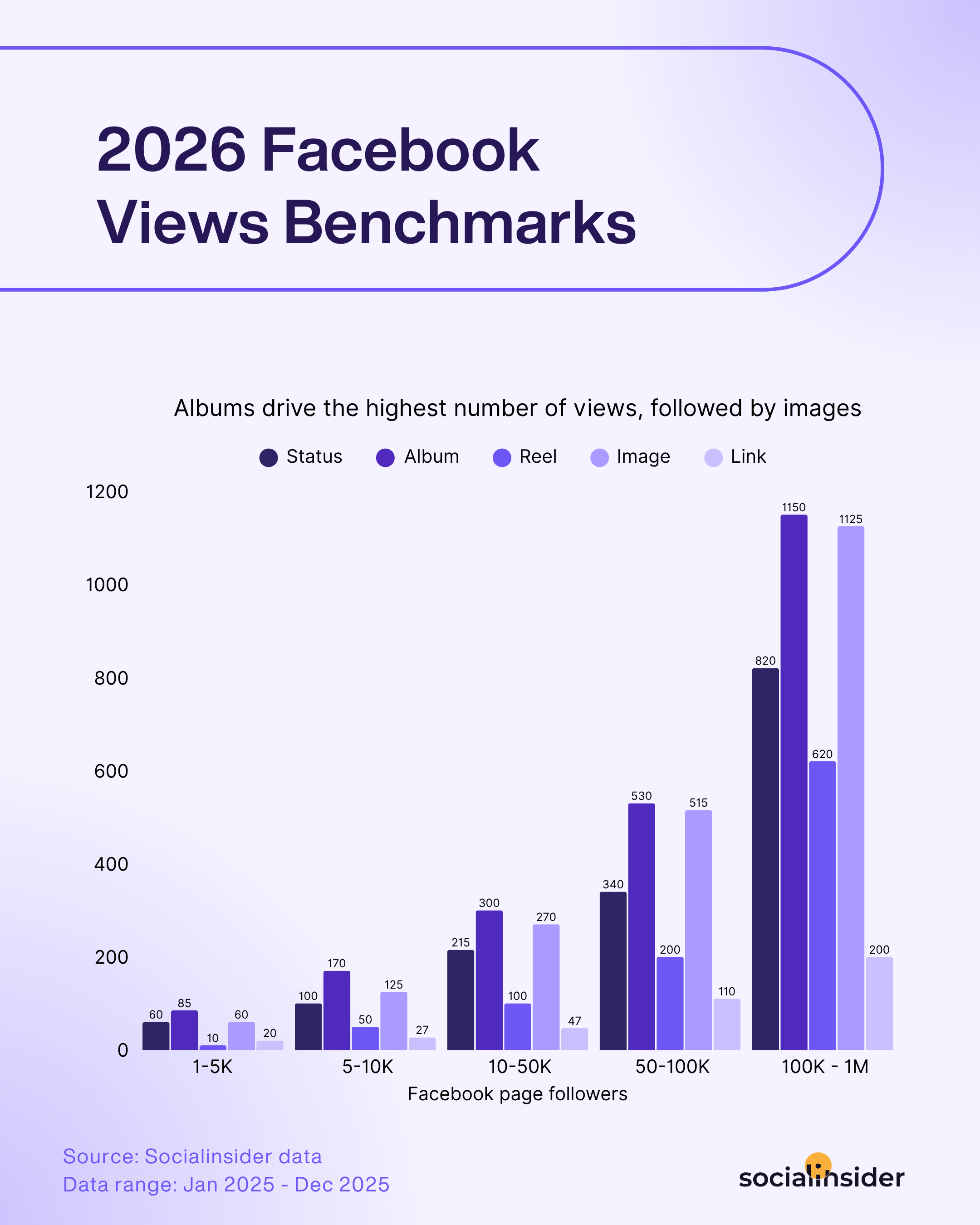
And here's an insight for you, coming directly from Socialinsider's newest Facebook benchmarks report: albums and images represent the content types that get the highest numbers of views. So, whenever you want to come up with optimization strategies for this metric, I recommend that you take this into consideration.
#3. Mentions
Mentions happen when someone tags your Facebook page in their post, comment, or story. It's a way for customers, partners, or other brands to engage in a dialogue with you.
Tracking mentions gives you insight into how people talk about your brand when you're not the one starting the conversation. I find mentions especially important when managing reputation or community engagement.
If you're running a campaign encouraging user-generated content, or if you've just launched something new, watching mentions helps you spot opportunities to join conversations or address concerns before they escalate.
Facebook audience metrics
Reach and views tell you how many people see your content. Audience insights tell you who those people are and whether your follower base is growing or stagnating.
#4. Audience demographics
Facebook helps you analyze your audience with demographic data, such as age, gender, and location. You can also see insights into when your audience is most active.
This data gives you context about who's on the other side of the screen. Coming up with marketing personas is fun, but real data tells you how to tailor your content to resonate.
I once worked with a client who assumed their audience was primarily women aged 25–34 because that's who bought their product in-store. But Facebook analytics showed their engaged audience is slightly older — women 45–54 were the most active group on the page. Turns out, they were buying for their younger relatives. That insight shifted the entire content strategy.
#5. Follower growth
Follower growth is straightforward: is your Facebook page gaining followers, losing them, or staying flat?
Many social media managers call this a vanity metric alongside likes, but I think that's too dismissive. Follower count often matters to stakeholders, and the platform's algorithm tends to favor accounts with healthy growth.
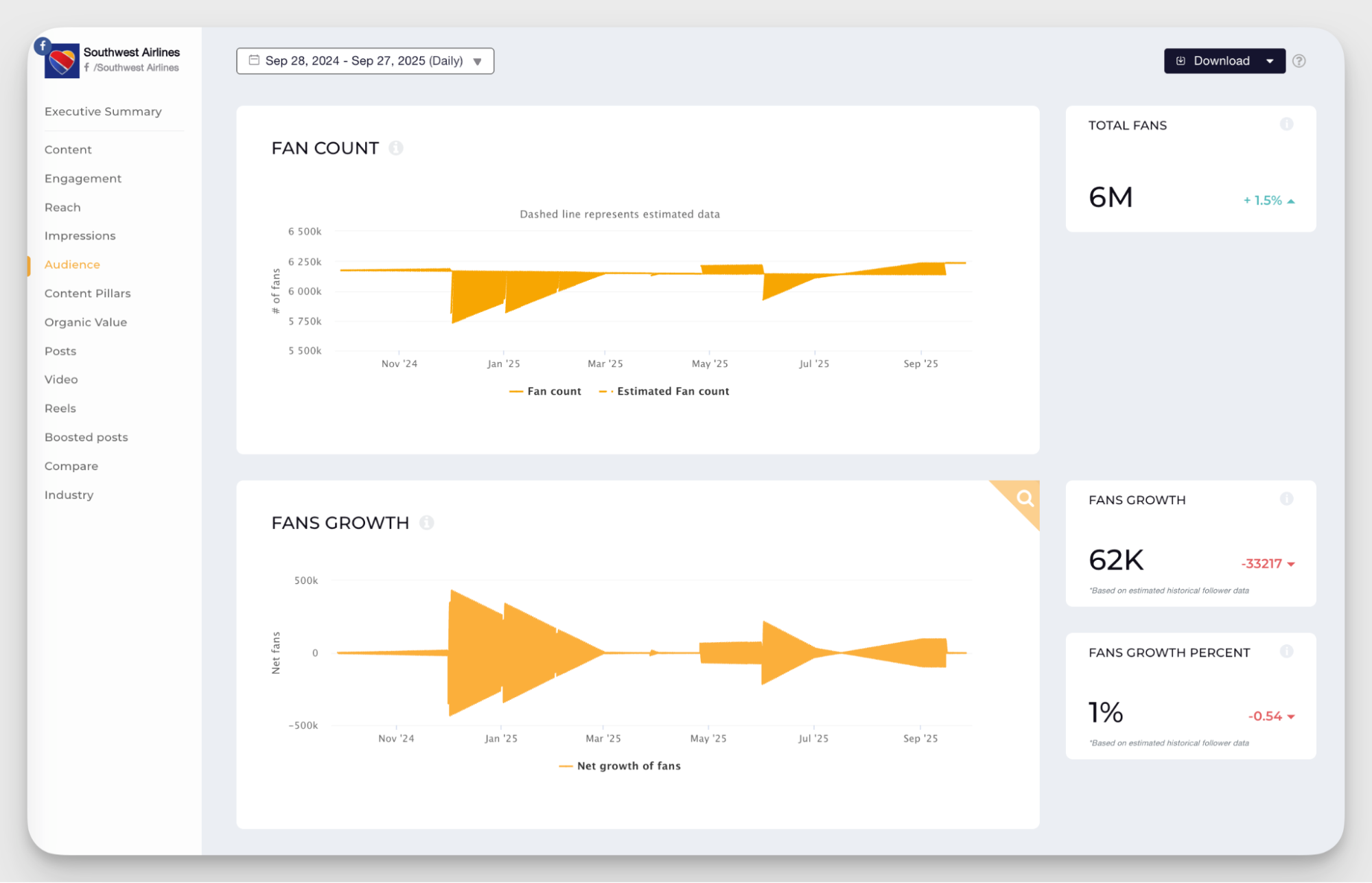
More importantly, follower growth reflects whether people find your brand worth following, and that's the first step in moving them down the funnel.
I track follower growth for two main reasons. First, to measure organic growth. If followers are steadily increasing, it means content is resonating and people want more.
Second, to evaluate campaigns. Did that ad spend bring new followers? Did the influencer partnership lead to a spike? Growth tells you whether your efforts are expanding your audience or just spinning wheels.
I always keep follower growth on my radar. It's not a self-sufficient metric, but it's an important signal that sits behind almost everything else you do on the platform.
Facebook core engagement metrics
Engagement metrics are the signals that tell you if your content is resonating. This group of Facebook metrics shows whether people interact with your content or just scroll past.
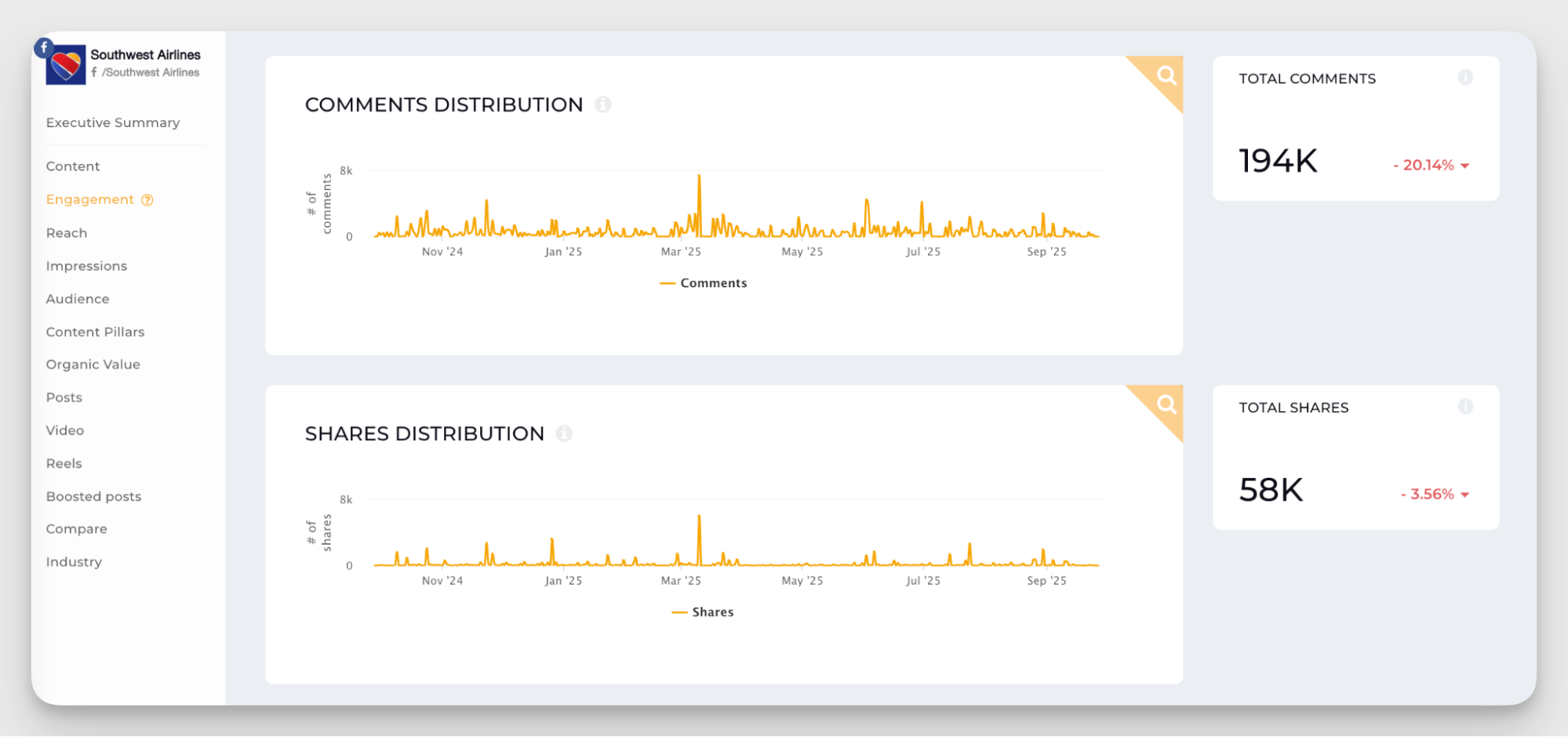
#6. Likes, comments, shares
The holy trinity of social media engagement metrics, these are your general markers of engagement. On their own, each tells a different part of the story — and knowing what each one actually signals helps you read your content performance more accurately.
Likes (and reactions)
Likes are the lowest-friction interaction on Facebook. Someone saw your post, felt something positive about it, and tapped a button. That's it. It's not a deep signal, but it's not meaningless either — a post with very few likes relative to its reach is telling you something isn't resonating.
Comments
Comments are a stronger signal than likes. Someone had to stop scrolling, think of something to say, and type it. That takes effort, which means your content triggered a real response.
But comments need context. A post with 80 comments sounds great until half of them are complaints or spam. Volume alone doesn't tell you much — you need to look at what people are actually saying. That's where sentiment analysis becomes useful, which I cover later in this article.
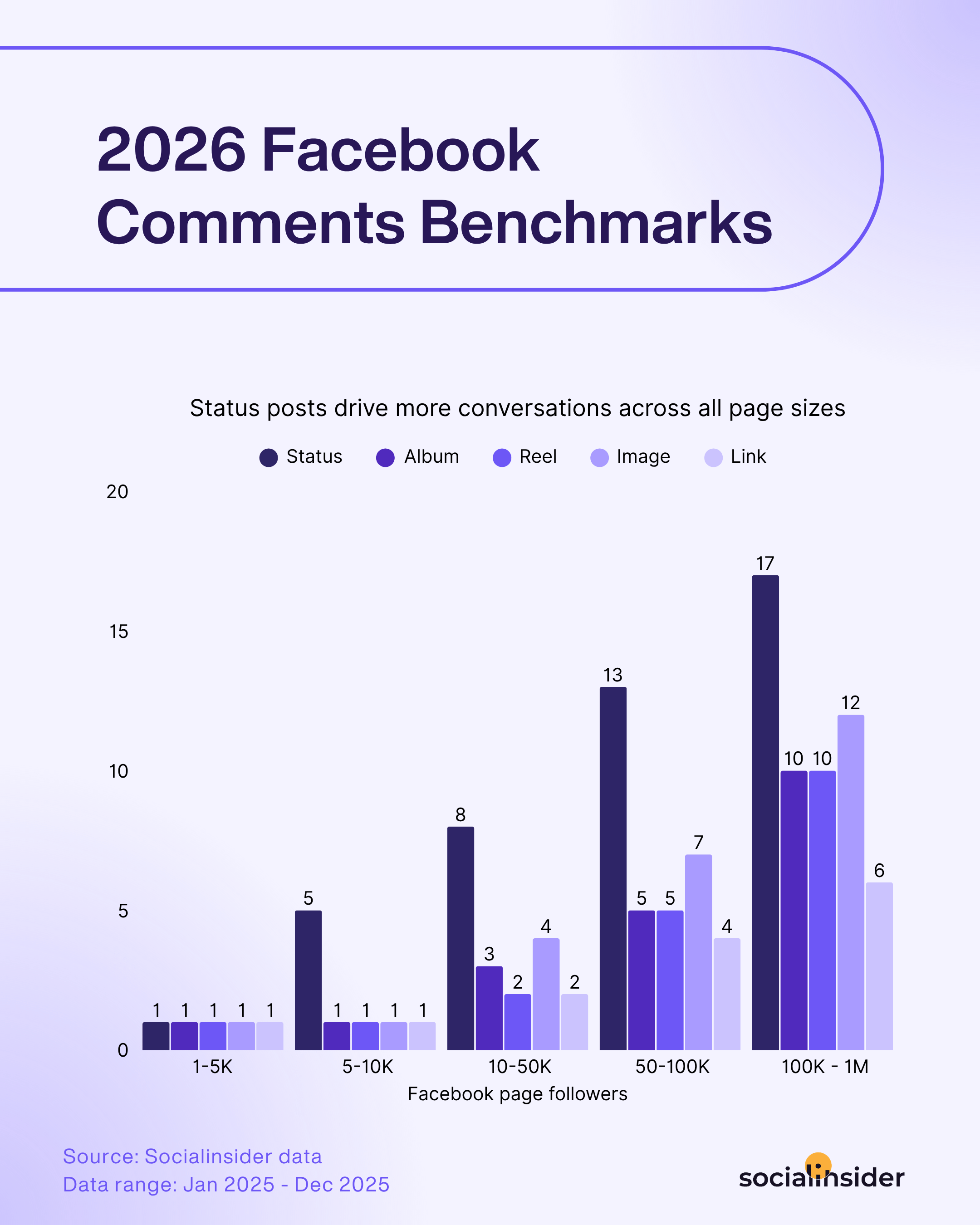
High comment volume on a specific type of post is also one of the clearest signals that a topic is resonating with your audience. If a particular format or subject line keeps pulling people into the conversation, lean into it.
Here are some more benchmarks to broadly understand Facebook's effectiveness in generating conversations across brand profiles.
Shares
Shares are the most valuable of the three. When someone shares your post to their own feed or sends it to a friend, they're putting their personal credibility behind your content. That's a meaningful endorsement — and it's also free distribution to an audience you didn't have to pay to reach.
If you're focused on organic growth, shares are the metric to watch most closely within this group. A piece of content that consistently gets shared is doing the work of an ad, without the ad spend.
Together, these three actions feed into your engagement rate — which is where the real strategic insight lives.
#7. Engagement rate
Engagement rate on Facebook is one of the most useful metrics you can track.
But here's the thing: there are different ways to calculate it, and the version you use depends on what you're trying to measure.
Engagement rate by followers shows how much your current audience interacts with your content. It's calculated by dividing total engagements (likes, comments, shares) by your follower count.
I use this when I want to understand how well I'm retaining and activating the people who already follow the page. If you're focused on deepening relationships or moving your existing audience down the funnel, this is your metric.
But engagement by followers might not be enough if your goal is growth.
Engagement rate by reach divides engagements by the number of people who saw the post. This one tells you how well your content performs with everyone it reaches, not just your followers.
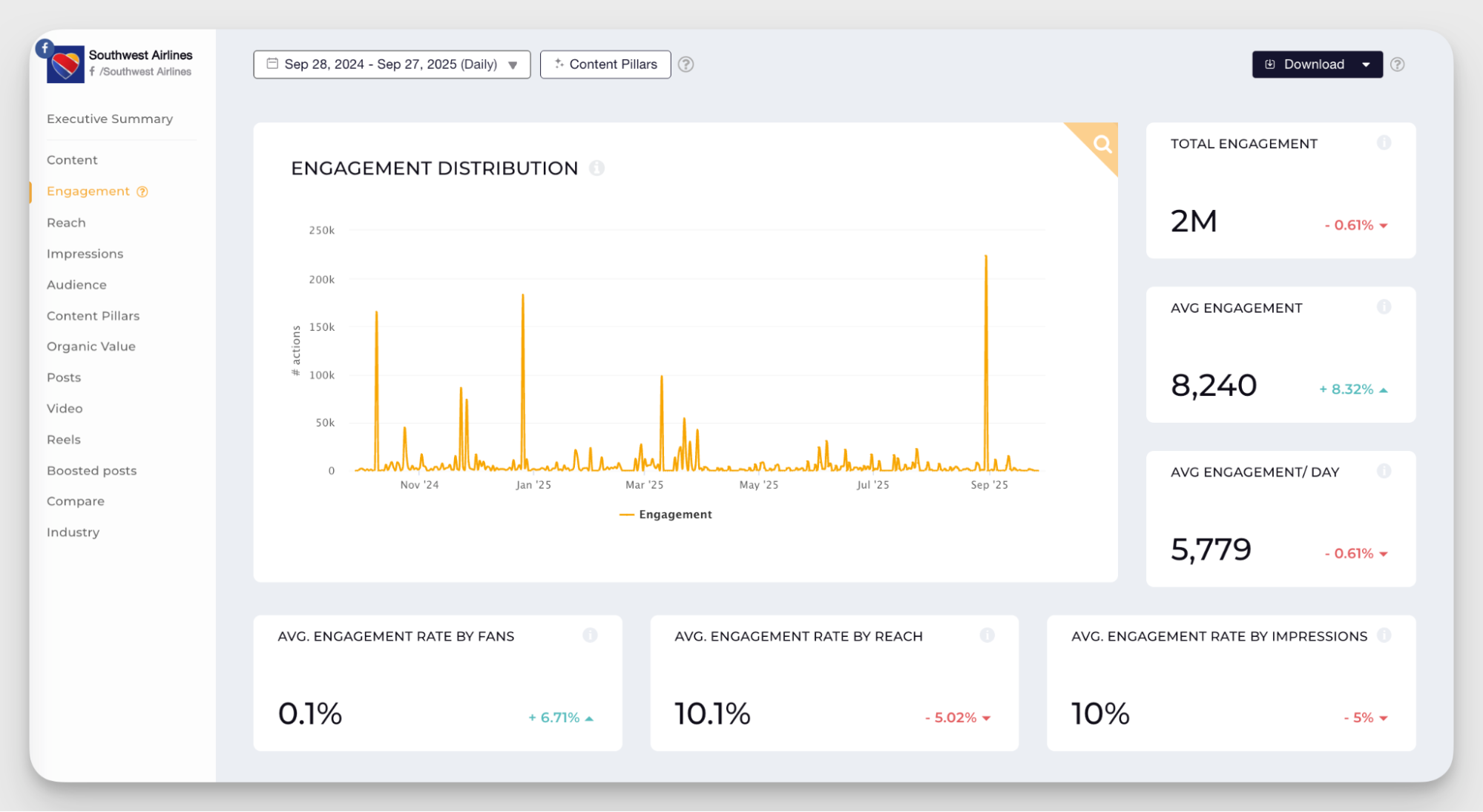
I track this when evaluating broader campaigns, boosted posts, or content aimed at attracting new audiences.
In my work, I personally prefer to have engagement by reach as my baseline and calculate other engagement rates if a particular campaign requires it.
Additional engagement metrics for powerful insights
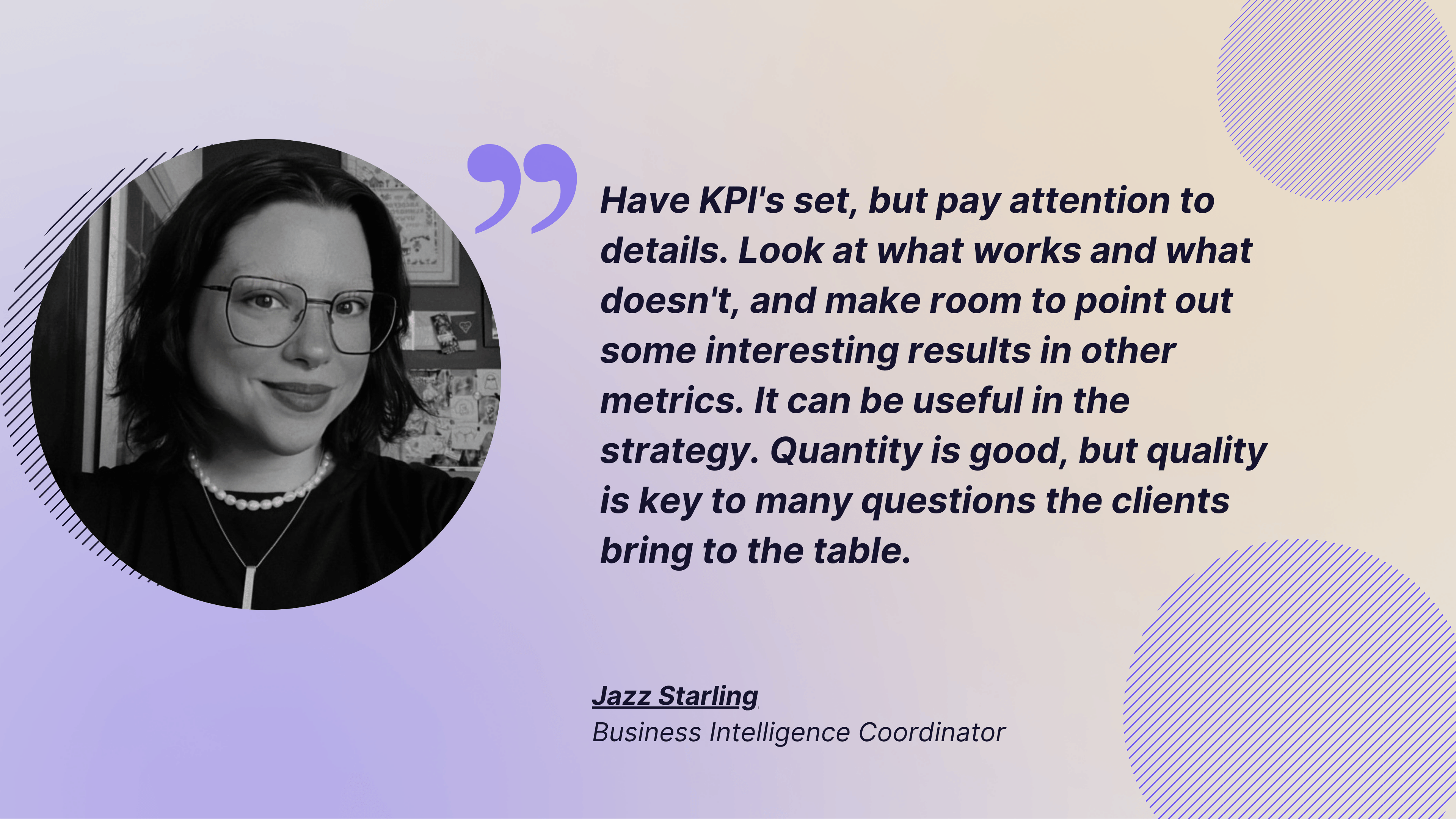
Core metrics are enough to fulfil your KPIs, but sometimes, you need to dig a little deeper to get a better insight. When talking about reading into your metrics, Jazz Starling, Business Intelligence Coordinator at Social Tailores, said:
Have KPI's set, but pay attention to details. Look at what works and what doesn't, and make room to point out some interesting results in other metrics. It can be useful in the strategy. Quantity is good, but quality is key to many questions the clients bring to the table.
Basic engagement metrics give you the headlines for your executive reporting. These additional engagement metrics are not exactly KPI-worthy, but they help you read between the lines and spot patterns to shape a smarter, more efficient content strategy for Facebook.
#8. Content format performance
Not all content formats perform equally on Facebook — and the only way to know which ones work for your specific audience is to look at the data.
Facebook gives you a range of formats to work with: Reels, images, carousels, text posts, and link posts. Each one behaves differently in the algorithm, reaches different segments of your audience, and drives different types of interaction. The mistake most teams make is defaulting to one or two formats out of habit rather than letting performance data guide the decision.
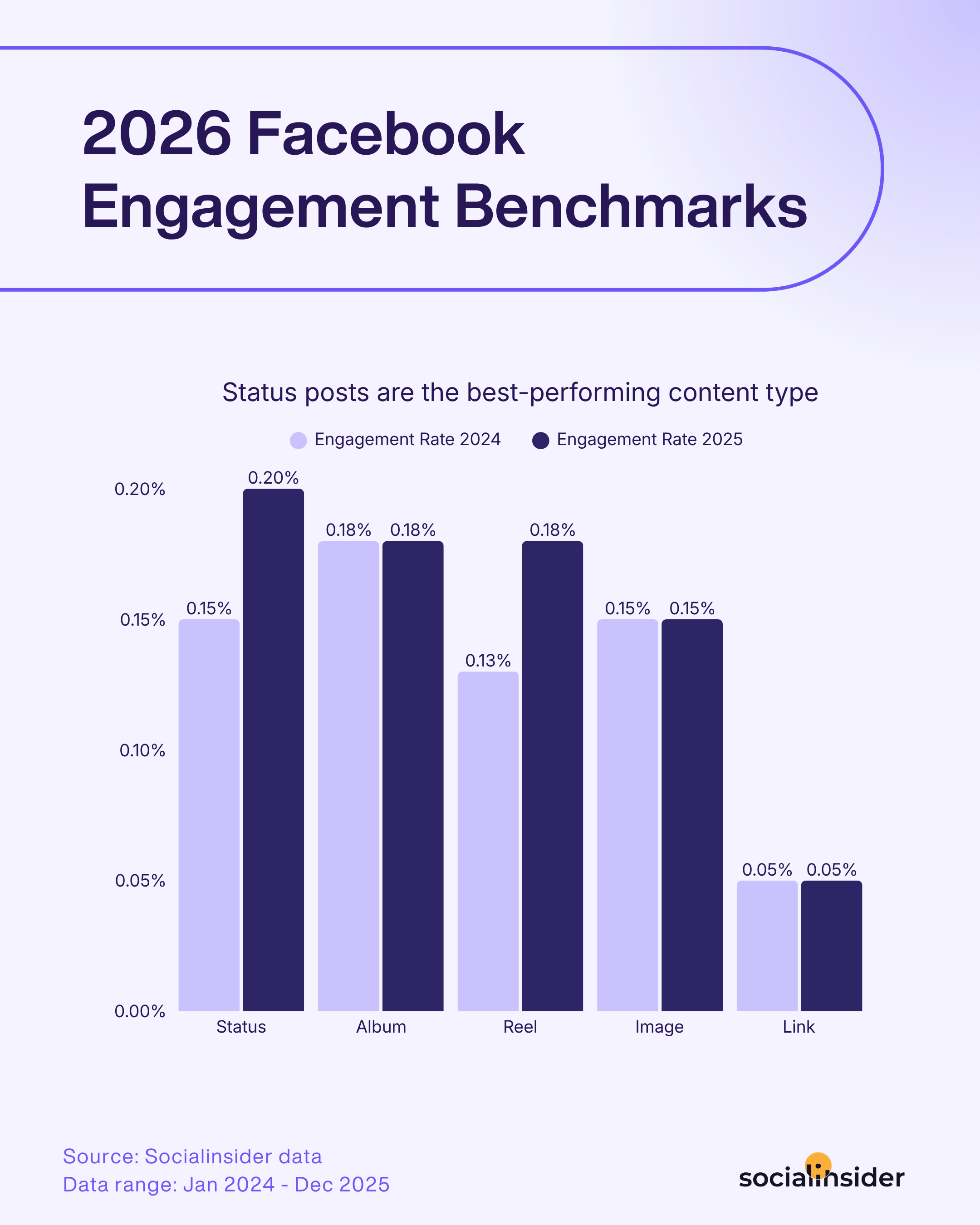
Once you know which formats are overperforming and which are underperforming relative to each other, you have something actionable: a data-backed reason to shift your content mix. Maybe status posts are driving reach but images are driving deeper engagement from your existing audience. Maybe Reels consistently outperform everything else, but you're only posting them once a month. That kind of insight doesn't come from instinct — it comes from the breakdown.
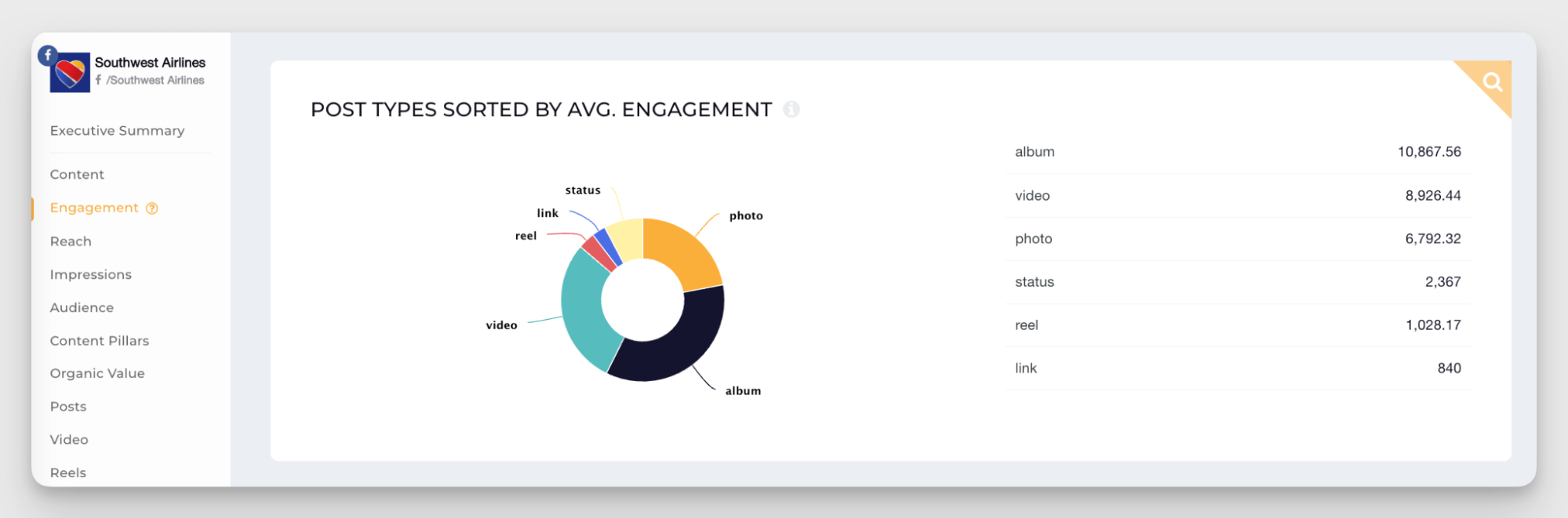
Meta's native analytics don't make this easy to track. But Facebook analytics tools like Socialinsider digest it for you so you can spot trends without manually sorting through every post.
#9. Best-performing content pillars
Content pillars are the recurring topics you come back to — the themes that structure your content strategy. Grouping posts by pillar helps you plan better and read your social media analytics more clearly.
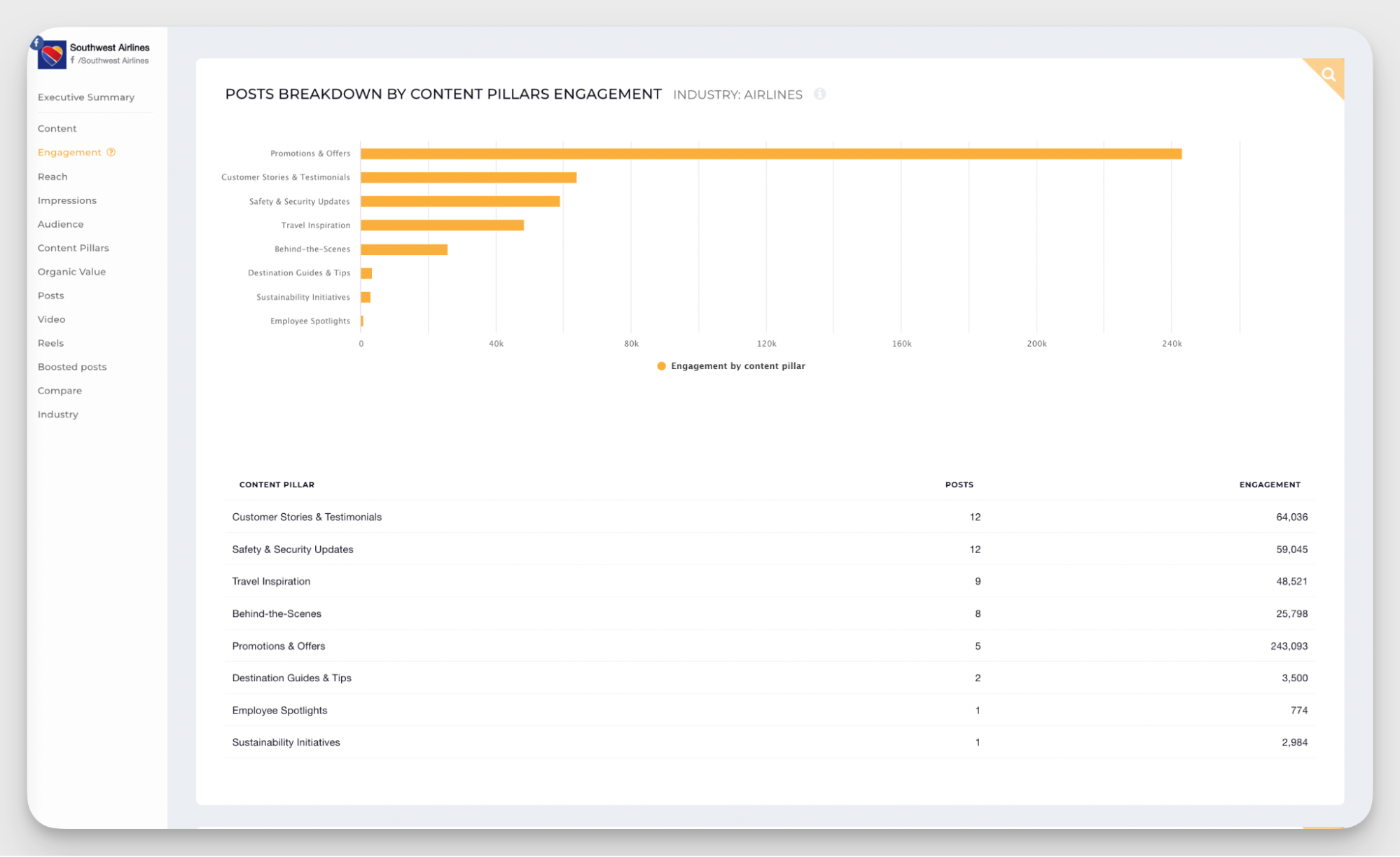
Tracking which pillars perform best on Facebook doesn't mean you abandon everything else and double down on one topic. But it does help you allocate effort more strategically and make use of a data-driven marketing approach.
I had a client who was convinced their audience loved behind-the-scenes content. It was a big part of our social media strategy. We spent a lot of time and effort from a small team creating detailed production videos.
But when we broke down performance by content pillar, behind-the-scenes was middle of the pack. At the same time, user-generated content, which we barely touched, was significantly outperforming everything else.
That data shifted our entire approach. It also saved us hours of unnecessary production work.
Facebook conversion metrics
Conversion metrics are crucial for proving social media ROI and the impact social media has on business.
But social media doesn't have to be only one or the other. A balanced strategy ensures both goals are ticked. You're just prioritizing one over the other depending on where you are in your marketing cycle.
If you're leaning toward the conversion side right now, here are the core metrics to track.
#10. Organic traffic and lead generation metrics
Conversions don't only come from paid ads — they can be organic, too. Facebook allows you to attach links to your posts (even if the algorithm isn't thrilled about it), and you can still measure traffic and leads from organic content with a bit of precision.
Link clicks
Link clicks tell you how many people clicked on the link in your post. You can see this metric directly in Facebook Insights under individual post performance.
It's a straightforward measure of whether your call-to-action is compelling enough to get people off the platform and onto your website or landing page.
Conversion rate from Facebook traffic
This tells you what percentage of people who clicked through from Facebook completed a desired action — signing up, downloading something, or making a purchase.
You'll need to track this through your website analytics (Google Analytics, for example) by filtering traffic sources to Facebook. Divide conversions by total Facebook clicks, and you've got your conversion rate. This metric helps you see if Facebook is sending quality traffic or just browsers.
Customer Lifetime Value (CLV)
This one can be a little tricky to calculate, especially if you’re not in retail, SaaS, or another quantifiable field. Customer lifetime value estimates the total revenue a customer will generate over their relationship with your brand.
To calculate it, multiply the average purchase value by purchase frequency and customer lifespan. Then compare CLV for customers acquired through Facebook versus other channels.
If Facebook customers have a higher CLV, it justifies more investment in the platform, even if upfront acquisition costs are higher.
#11. Facebook paid advertising metrics
Paid conversions are usually easier to track than organic ones. As long as you're aware of competitive benchmarks, like how much a user is supposed to cost in your industry, you can measure the success of your social media campaign rather quickly.
However, remember that setting KPIs for paid campaigns depends heavily on your budget, creative quality, and most importantly, the competitive landscape. What works in one niche might flop in another.
Click-Through Rate (CTR)
CTR measures how many people clicked your ad after seeing it. It's calculated by dividing total clicks by total impressions, then multiplying by 100. You can find this metric in your Facebook Ads Manager.
A strong CTR means your ad creative and messaging are resonating. If your CTR is low, the problem is usually in the hook or the visual — people aren't compelled to click.
Cost Per Click (CPC)
CPC tells you how much you're paying each time someone clicks your ad. Facebook calculates this automatically in Ads Manager by dividing total ad spend by total clicks.
Lower CPC means you're getting more traffic for your budget. If CPC is climbing, it could mean your audience is saturated, or your ad relevance score is dropping, so it’s time to refresh your ad creatives.
Cost Per Mille (CPM)
CPM is the cost to show your ad to 1,000 people. It's calculated by dividing total spend by impressions, then multiplying by 1,000.
I usually use CPM for awareness campaigns where you care more about eyeballs than clicks. High CPM means competition for your audience is fierce, or your targeting is too narrow.
Cost Per Acquisition (CPA)
CPA measures how much you're spending to acquire one customer or lead. Divide total ad spend by the number of conversions. This metric can also be found in the Facebook Ads Manager report.
This is one of the most important metrics to evaluate how effective your social media marketing is because it directly ties spend to results. If CPA is higher than your profit margin, the campaign isn't working properly.
Return on Ad Spend (ROAS)
ROAS tells you how much revenue you're generating for every dollar spent on ads. It's calculated by dividing revenue from ads by total ad spend.
For example, a ROAS of 3:1 means you're making $3 for every $1 spent. This metric is critical for understanding the profitability of your whole endeavor. Even if CPA looks good, if ROAS is weak, your pricing or product margins might need tweaks.
Facebook video metrics
Video is taking over all social media platforms, and Facebook is no exception.
Understanding video metrics is essential if you want to integrate video into your strategy effectively and know whether it's actually working for you.
#12. Video engagement and average engagement per video
Video engagement measures how people interact with your video content — likes, comments, shares, and reactions. Average engagement per video gives you a baseline for how your video content performs compared to your other posts.
Engagement rate is important here, but I also recommend keeping an eye on shares. Shares mean people thought your video was worthy of putting on their own feed or sending to friends. That's a strong signal if you're looking for organic growth.
#13. Video plays and average plays per video
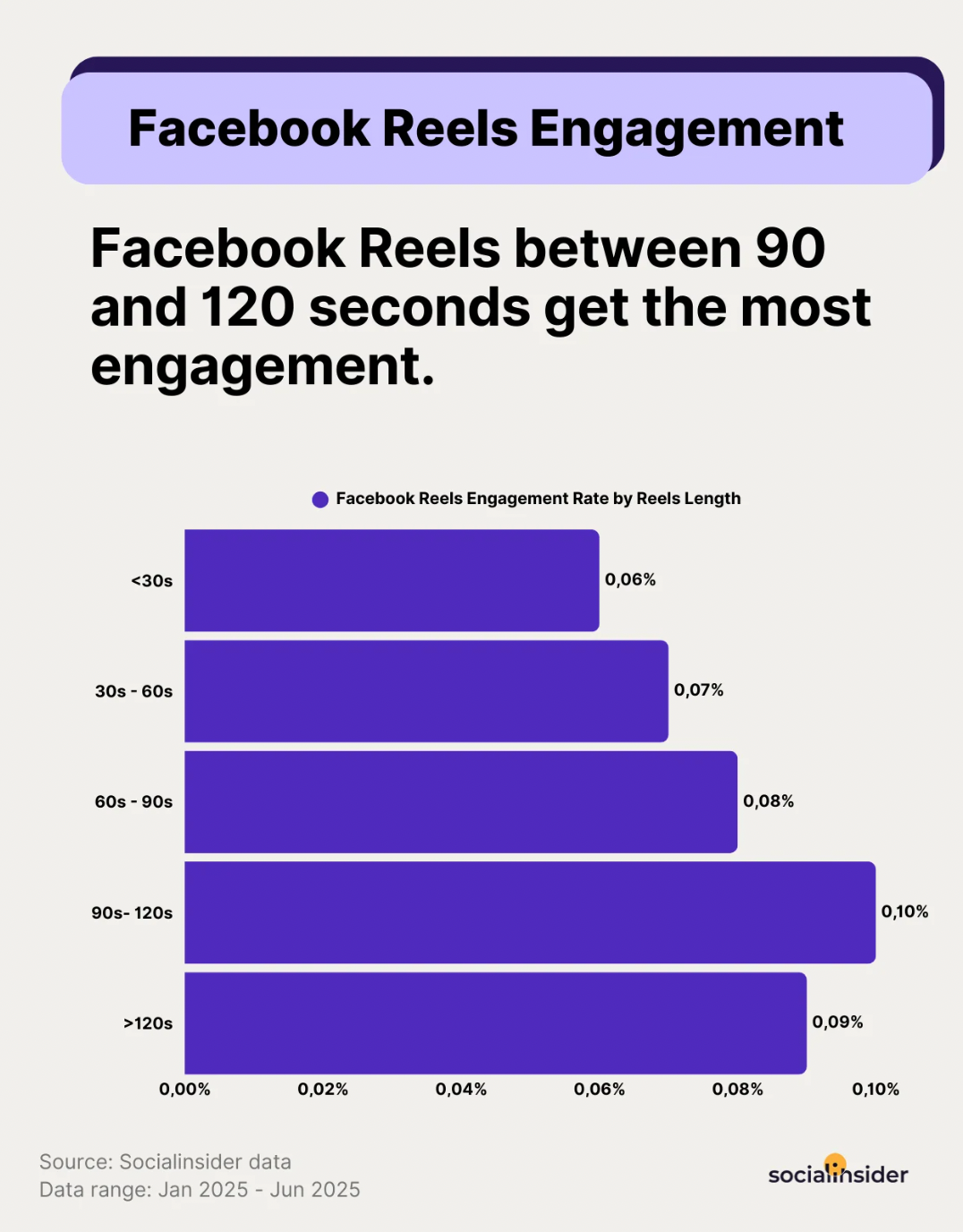
When it comes to video specifically, Facebook tracks how many times your video was actually played — not just how many times it appeared in someone's feed. This is what Meta calls video plays, and it's a more meaningful starting point for video performance than the general Views metric, which counts all content types and includes passive scroll-bys.
Facebook counts a play after approximately 3 seconds of watch time, so it's not a perfect measure of genuine interest — but it's a reasonable filter. If someone saw your video in their feed but didn't let it run for even 3 seconds, it doesn't count as a play.
The more useful number to track regularly is average plays per video. A single video racking up plays tells you that specific piece worked. An average across all your videos tells you whether your video content as a whole is consistently capturing attention, or whether you're relying on the occasional outlier to prop up the numbers.
If your average is low but a few videos spike well above it, you have winners worth studying. Look at what those videos have in common — the hook, the topic, the format, the length — and use that as a template for what to produce next.
#14. Video watch time
Video plays tell you how many people started watching your video. Average watch time tells you how many of them actually stayed.
This is the metric that separates a video with a strong hook from a video with a strong strategy. You can have impressive view counts and still be losing your audience in the first five seconds — and if that's happening, the algorithm notices. Facebook's distribution favors videos that hold attention, so a low average watch time doesn't just signal a content problem, it actively limits your reach.
The way to use this metric is less about hitting a specific number and more about spotting patterns. If a particular video format or topic consistently shows higher average watch time than others, that's your signal to produce more of it. If you notice watch time dropping sharply at a certain point across multiple videos, something structural is off — maybe the intro is too slow, or the content loses focus halfway through.
#15. Top videos
Identifying your top-performing videos helps you double down on what works. Look at the hooks that grabbed attention, the formats that held it, and the topics that drove the most engagement or shares.
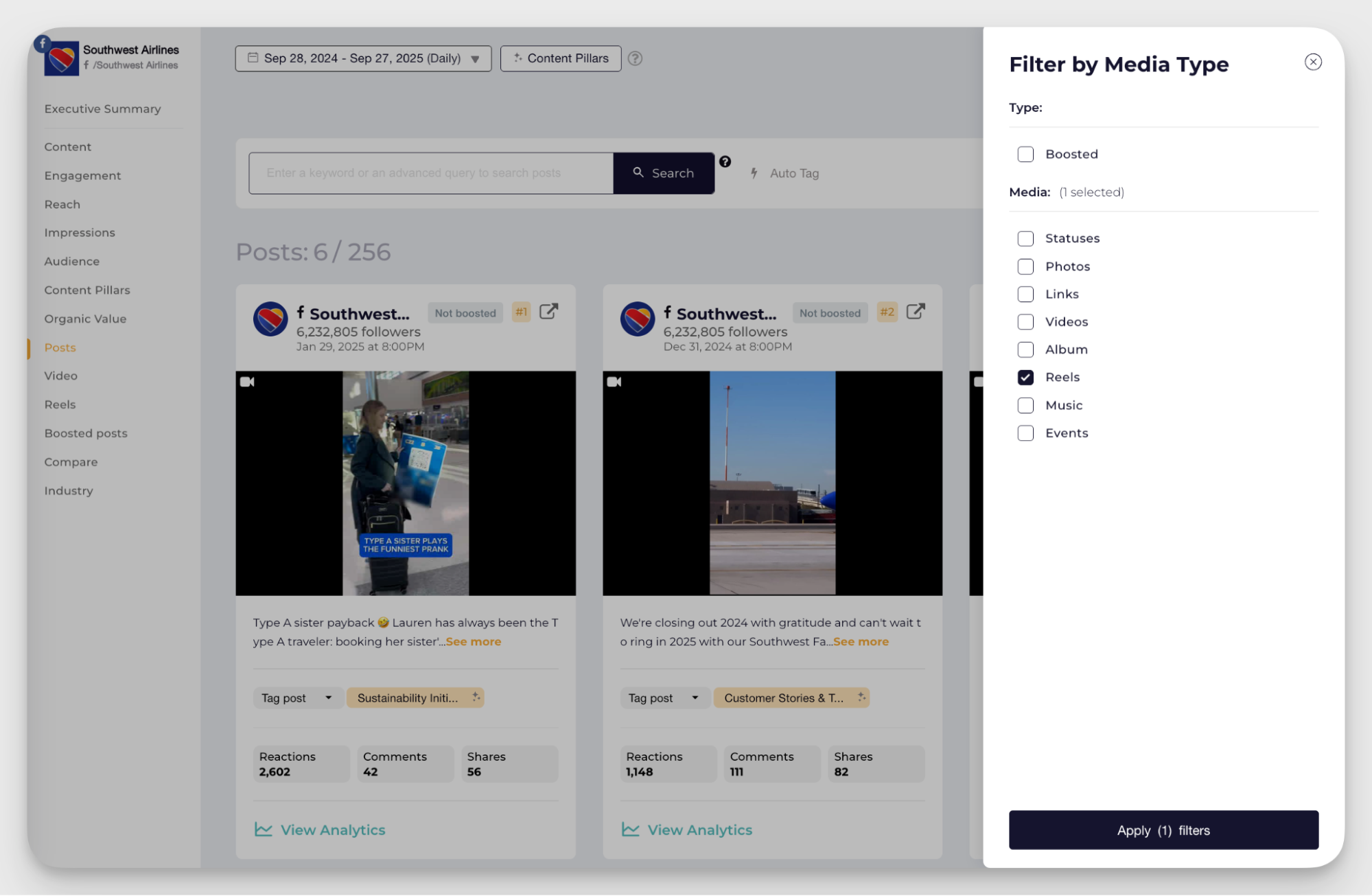
Not all of your content has to go viral, but if some videos are performing better than others, use them as a playbook for future content. Take into account things like hooks, topics, the length of the video, and captions. Anything can be the decisive factor, but hooks usually hit the hardest.
My tip — don’t be too worried about being repetitive. Facebook loves original videos, but if you see that a particular hook or topic works every time, lean into it and find new ways to apply it.
How does Socialinsider consolidate in-depth Facebook metrics tracking?
Meta Business Suite covers the basics, but it has real limitations once you move beyond surface-level reporting. Engagement rate isn't calculated for you. Content pillar performance requires manual tagging and spreadsheet work. And anything involving competitor data simply isn't available — Facebook doesn't expose other pages' analytics natively.
For a social media leader who needs to report confidently to stakeholders, that fragmentation costs time and creates gaps.
Socialinsider pulls this together in one place — your own performance data, competitor benchmarks, content pillar analysis, and organic value — updated automatically, without the manual work.
Competitive benchmarks
Context is what turns a metric into an insight. Knowing your engagement rate is 2.3% is useful. Knowing it's higher than three of your four closest competitors — and what content pillar is driving that gap — is what actually informs your next move.
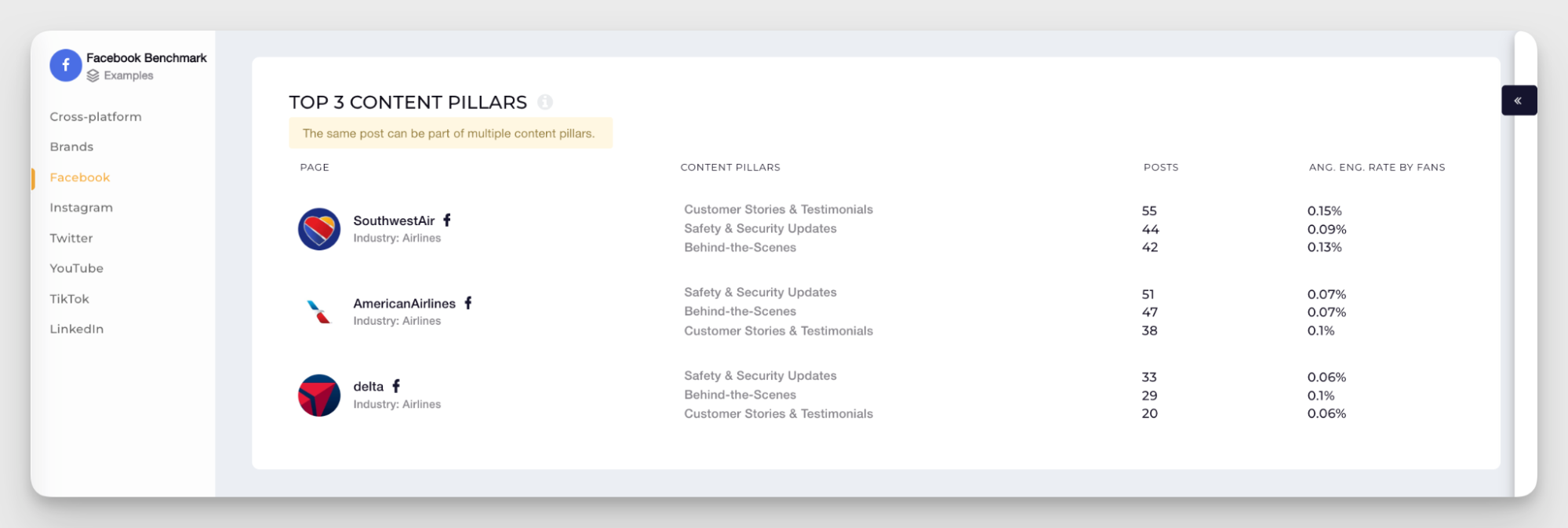
Socialinsider lets you add competitor Facebook pages directly to your dashboard and compare engagement rates, follower growth, and content pillar performance side by side, across any date range. No access to their accounts needed — Socialinsider pulls publicly available performance data and structures it for comparison.
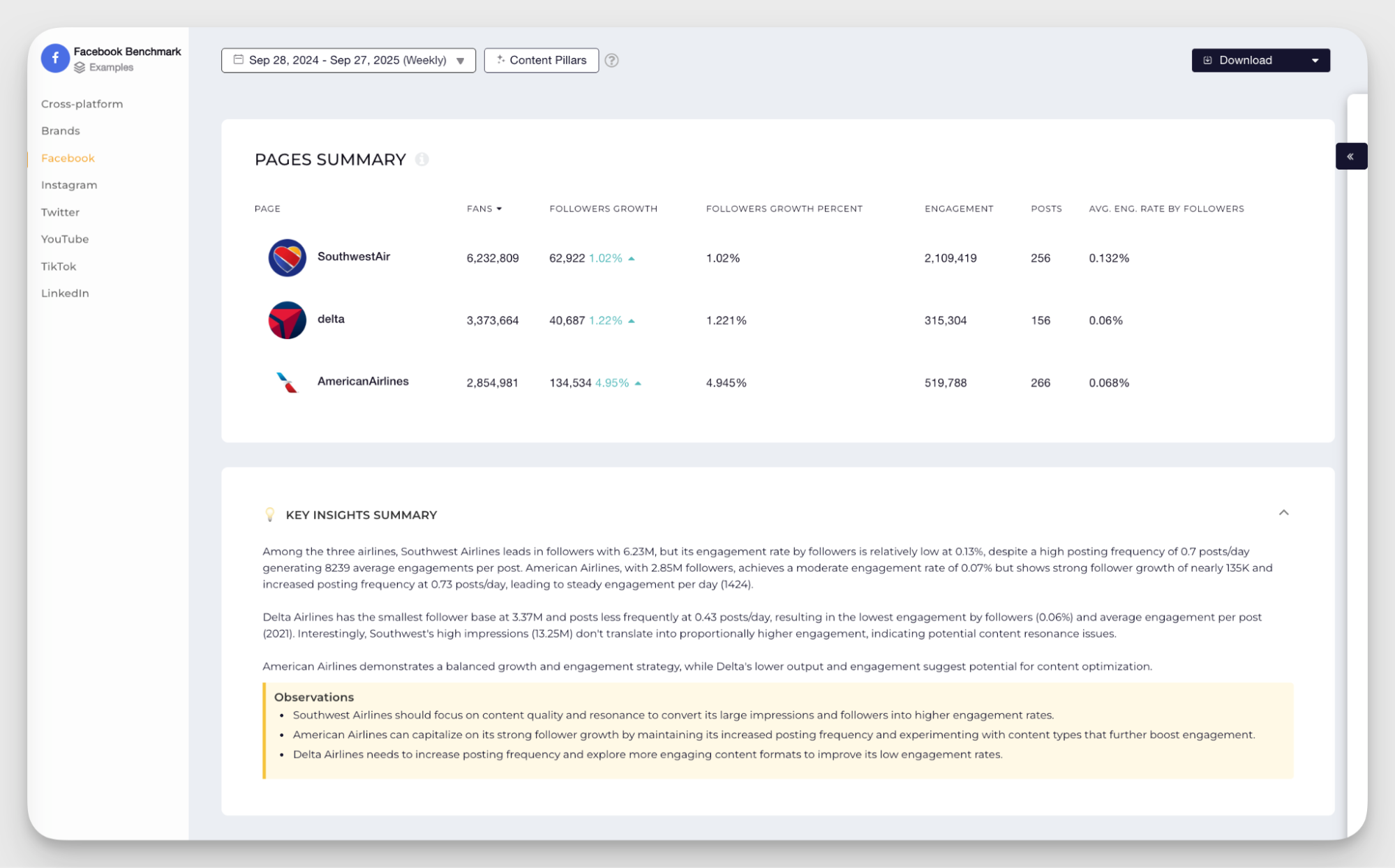
The content pillar comparison is particularly useful here. You can see not just how competitors are growing, but what topics and content themes are driving their engagement — and spot gaps where they're underinvesting while your audience would respond well to more of that content.
This kind of analysis isn't a one-time exercise. The competitive landscape shifts, posting strategies evolve, and what worked six months ago might not be working now. Having the benchmarking data always available in your dashboard means you're never making strategic decisions without knowing where you stand.
Organic value calculation
One of the hardest parts of Facebook reporting is justifying organic social media investment to stakeholders who think in budget terms. Reach and engagement rate are useful internally, but they don't translate naturally into the language executives use — which is money.
Socialinsider's Organic Value feature bridges that gap. It estimates how much you would have had to spend on paid ads to achieve the same reach and engagement you're generating organically, giving your content efforts a monetary equivalent that's easy to communicate upward.
The calculation is based on industry-standard CPM and CPC benchmarks by default, but you can customize the input values to reflect your actual ad costs — making the estimate as accurate as your own campaign data allows.
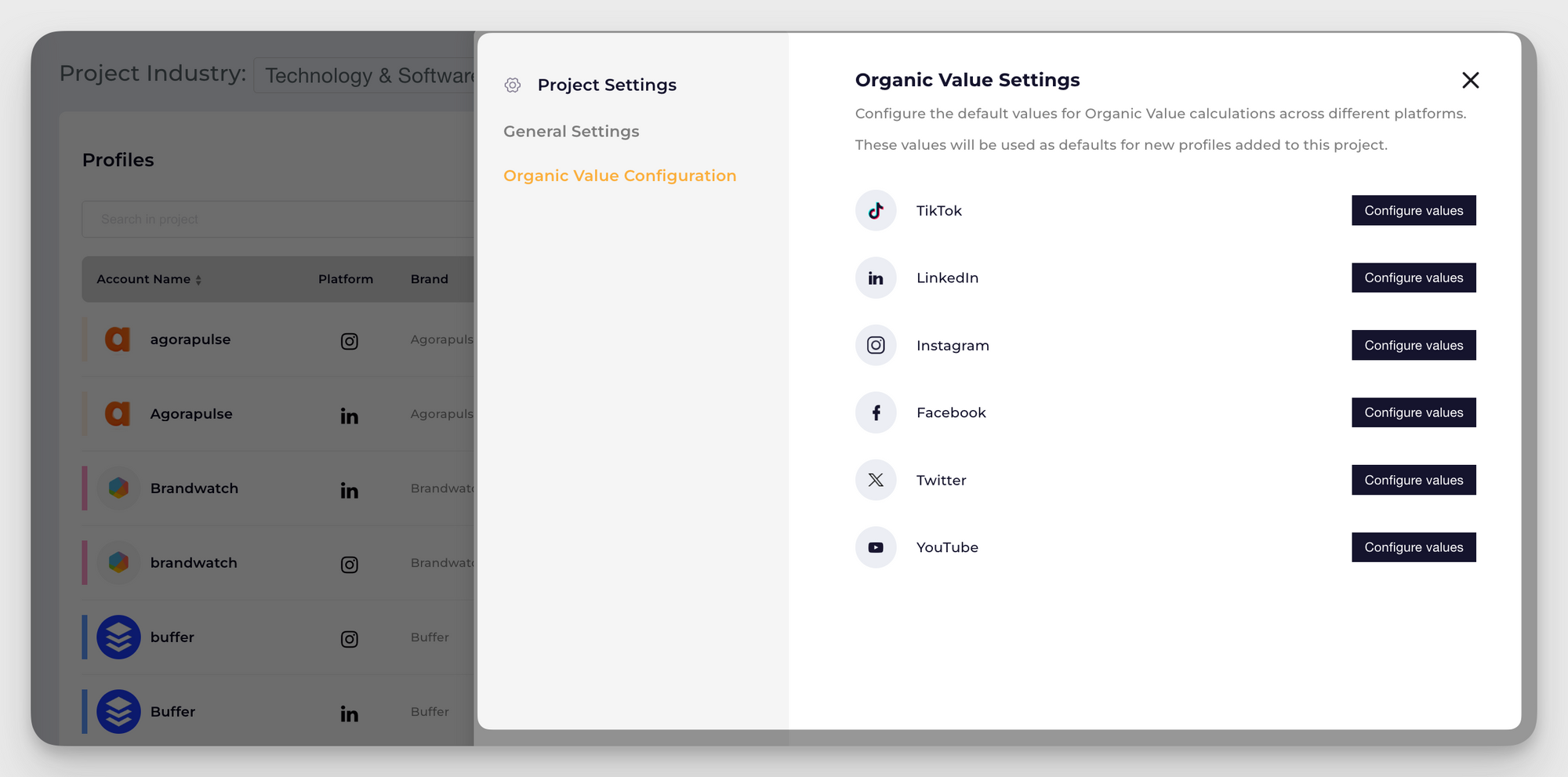
In a reporting context, this shifts the conversation entirely. Instead of explaining what engagement rate means to a CFO or a Head of Marketing, you can show them a dollar figure for what your organic content delivered this month — and what it would have cost to buy that same exposure through paid.
It's also a useful early warning signal. If your organic value is trending down while your posting frequency stays the same, it usually means reach or engagement is quietly declining — a prompt to revisit your content strategy before the drop becomes significant enough to show up in business results.
How to turn the metrics into business insights?
We don’t track metrics for the sake of metrics — we do that to know what’s next. Here are my top five tips on how to translate your numbers into actions:
- Start with goals, not dashboards. Establish what your current goals are. Are you building awareness, driving traffic, or converting leads? Your goal determines which metrics matter.
- Look for patterns, not one-time wins. A single viral post is exciting, but it's not a strategy. Analyze trends over weeks or months to see what consistently works.
- Compare context, not numbers. A 5% engagement rate means little without context. Compare it to your past performance, your competitors, and industry benchmarks.
- Tie metrics to money. Executives care about ROI. Connect your metrics to revenue whenever possible. If you can draw a line from a metric to a dollar, you've made your case.
- Act on insights quickly. Data is only useful if you do something with it. If a content format isn't working, stop pushing it. If a competitor is ahead of you in video, test it yourself. The faster you act on what the metrics are telling you, the faster you improve.
Final thoughts
Facebook metrics can feel endless, but you don't need to track everything to build a strong strategy. What you need is clarity — understanding what each metric measures, why it matters, and which ones align with your specific goals.
Choose the right metrics for the moment, track them consistently, and use the insights to make better decisions.
FAQs on Facebook metrics
What Facebook metrics matter most for executive reporting?
Executives typically care about three things: how many people you're reaching, whether that audience is engaging, and whether social activity is contributing to business outcomes. The most defensible metrics for executive reporting are reach (audience size), engagement rate (content quality signal), follower growth (audience building trend), and organic value (an estimated dollar equivalent for your organic performance). If paid ads are part of the picture, add ROAS and CPA. Avoid leading with raw likes or comments — they don't mean anything without context.
How often should I review Facebook metrics?
For most teams, a weekly check-in on engagement rate, reach, and top posts is enough to catch issues early and spot what's working. A monthly review should go deeper — content pillar performance, follower growth trends, and competitor comparison. Quarterly reviews are the right cadence for strategic decisions like shifting your content mix or adjusting your benchmarks. Don't pull daily unless you're running active paid campaigns where faster iteration matters.
Kseniia Volodina
Content marketer with a background in journalism; digital nomad, and tech geek. In love with blogs, storytelling, strategies, and old-school Instagram. If it can be written, I probably wrote it.
Know what your competitors do — before your manager asks
Get instant social benchmarks & reports without manual work.
You might also like


Improve your social media strategy with Socialinsider!
Use in-depth data to measure your social accounts’ performance, analyze competitors, and gain insights to improve your strategy.