Key Steps and Strategies For Running An Effective LinkedIn Company Page Audit
Enhance your strategy through a comprehensive LinkedIn audit! Learn how to analyze your LinkedIn performance and get optimization insights!


If you've ever finished a month of LinkedIn content, looked at the numbers, and thought "we posted consistently, so why does nothing feel like it moved?" — this guide is for you.
A LinkedIn audit is how you get that answer. Not by guessing, not by refreshing the analytics tab hoping something will look different, but by actually sitting down and looking at your page, your content, and your audience with fresh eyes and a clear framework.
Throughout my career in marketing and social media, an important thing that I've noticed and learned is that brands making the most of LinkedIn aren't necessarily the ones posting the most or with the biggest following. They're the ones who know exactly what's working and why. And that's what a LinkedIn page audit gives you.
Now, let me walk you through the process of running one.
Key takeaways
-
Define your goal: Start by clearly defining your primary LinkedIn objective so you evaluate performance based on what actually drives business impact.
-
Audit your company page profile: Optimize your LinkedIn page fundamentals (branding, copy, and SEO fields) because they directly influence visibility, credibility, and conversions.
-
Audit your audience demographics: Ensure your audience matches your ICP, since even strong engagement is meaningless if it comes from the wrong people.
-
Audit your content performance and pillars: Analyze formats, themes, and top-performing posts to identify repeatable content patterns that consistently drive results.
-
Measure Organic Value: Translate your LinkedIn performance into monetary value to demonstrate real business impact and justify investment.
What is a LinkedIn Audit?
A LinkedIn audit is a structured review of your company page, content strategy, and performance data — done with the goal of figuring out what's working, what isn't, and what needs to change.
I want to be specific about that word "structured," because I think it's the part most people skip. It's easy to look at your LinkedIn analytics casually — check which post did well this week, notice your follower count went up a bit — and feel like you're on top of things. But that's not an audit. That's monitoring. An audit is when you step back from the day-to-day and look at the whole picture at once.
How often should you run a LinkedIn audit?
My honest answer: quarterly is the minimum, and monthly is better if you're actively posting and running campaigns.
The more regularly you do it, the less overwhelming it becomes each time. A quarterly audit where nothing has drifted too far off course takes a couple of hours. A LinkedIn audit you've been putting off for a year is a much bigger lift — and by then, you've already lost time you could have spent optimizing.
Pick a cadence and put it in the calendar. Treat it like a recurring deliverable, not something you get to when things slow down.
A quick LinkedIn company page audit checklist
Before going deep on each step, here's a quick-reference checklist you can use every time you run a LinkedIn audit. Think of it as your starting point — a way to make sure nothing falls through the cracks before you dive into the analysis.
The sections below walk through each item in detail. But if you ever need a fast pass — a new client, a quick internal review, a sanity check before a big campaign — this checklist is what I'd hand you.
Profile & branding
- Profile photo (logo) is current, high-resolution, and correctly sized
- Banner image is on-brand, includes a CTA or value statement, and is up to date
- Tagline (120 characters) is filled in and uses relevant keywords
- About section is complete, keyword-optimized, and the first 156 characters work as a standalone preview
- Custom CTA button is set and links to the right destination
- Company details are accurate (industry, size, website, founded date)
- Specialties section includes relevant keywords for LinkedIn search
Content & engagement
- Reviewed last 90 days of posts for engagement patterns
- Identified top 3 performing content pillars
- Identified lowest-performing content types or themes
- Checked posting frequency — consistent cadence vs. gaps
- Reviewed content mix (formats: text, image, video, document, polls)
- Evaluated comment quality and response rate
Audience
- Reviewed follower demographics (job function, seniority, industry)
- Confirmed audience composition matches your ICP
- Checked follower growth trend over the last 90 days
Performance & ROI
- Tracked key metrics: reach, impressions, engagement rate, follower growth, CTR
- Measured Organic Value of top posts or campaigns
- Compared current period vs. previous period
Tools & reporting
- Audit findings documented in a LinkedIn audit template or report
- Action items assigned with owners and deadlines
How to run a LinkedIn audit: a step by step process
Step 1: Define what you want LinkedIn to do for your business
This is the step most people rush through — or skip entirely — because it feels like housekeeping before the "real" audit begins. But in my experience, it's actually where most LinkedIn audits go wrong.
If you don't define what LinkedIn is supposed to achieve for your business before you start pulling data, you end up optimizing for the wrong things.
So before anything else, answer this question honestly: what do we actually need LinkedIn to do for us right now?
Here's how the answer should shape your audit:
| Goal | What to prioritize in your audit |
|---|---|
| Brand awareness | Reach, impressions, follower growth rate |
| Lead generation | CTR, website traffic from LinkedIn, conversion actions |
| Community building | Engagement rate, comment quality, response rate |
| Employer branding | Employee advocacy metrics, culture content performance, talent-related engagement |
| Thought leadership | Article and long-form post performance, share rate, profile visits |
Most brands are working toward more than one of these at once — which is fine. But pick a primary goal before you start, and let it determine which numbers carry the most weight in your audit. Every recommendation you make at the end should tie back to it.
One more thing: document it. Write the goal at the top of your audit report before you look at a single metric. It keeps you honest when you're deep in the data and tempted to chase a number that looks good but doesn't actually matter.
Step 2: Audit your LinkedIn company page profile
Here's a mistake I see constantly: teams spend hours analyzing content performance and barely five minutes on their profile. I understand why — content is more interesting to look at than whether your tagline is optimized. But your LinkedIn company page profile is the foundation everything else sits on, and it's also one of the most directly controllable parts of your LinkedIn presence.
Fix the foundation first. Then worry about what you're building on top of it.
Here's how Jameka Christy, social media strategist, approaches a LinkedIn audit, for example:
Whenever I do a social media audit, I usually start by looking at the basics, making sure all of the profiles are set up correctly, branded consistently, and fully optimized.
Then I’ll dig into the content itself: what’s been posted, how often, and what type of content performs best. I also look at the audience, who’s following, how engaged they are, and whether that matches the target customer the business wants to reach. From there, I’ll compare what’s working versus what’s not, and I’ll pull together clear recommendations for how to improve moving forward.
Profile Photo
Your profile photo should be your current logo — properly sized (300 x 300px), high-resolution, and centered. It sounds obvious, but I've seen brands running audits only to find an outdated logo, a cropped version, or a blurry upload that's been quietly sitting there for years.
Check it on both desktop and mobile. What looks fine on a large screen can appear cut off or pixelated on a phone, and most people are browsing LinkedIn on their phones.
Banner Image
Your banner (1128 x 191px) is the piece of real estate most company pages completely waste. I'm not exaggerating — the majority of brand pages I look at have either a generic stock image, a plain color, or something that made sense two rebrandings ago and never got updated.
A good banner does at least one of these things:
- Communicates your core value proposition in a single line
- Includes a clear CTA ("Try it free," "Read our latest report")
- Reinforces a current campaign or product launch
If yours hasn't been updated in over six months, refresh it. It takes less time than you think and it's one of the highest-visibility changes you can make.
Tagline
LinkedIn gives you 120 characters for your tagline, and it appears directly under your company name everywhere your page shows up — in search results, in suggested pages, in follower feeds. That's a lot of exposure for a field most brands either leave blank or fill with something vague.
Use it like a headline, not a slogan. What do you do, who do you help, and what outcome do you deliver? Write it the way your audience searches, not the way your brand guidelines sound internally.
About Section & LinkedIn SEO
This is the field I spend the most time on in any LinkedIn page audit, because it does two jobs at once: it tells your story to humans and it signals relevance to LinkedIn's search algorithm — and most brands do neither particularly well.
A few things I always check:
The first 156 characters. LinkedIn truncates your About section in search previews at around 156 characters. Whatever appears in those first two lines is what people see before they decide to click "see more." I'd argue this is the most important copy on your entire page — and it's almost always wasted on a founding story or a generic mission statement. Lead with what you do and who you help. Save the backstory for later in the section.
Keyword coverage. LinkedIn uses your About section to determine when your page appears in search results, both within the platform and on Google. Think about the terms your ICP actually searches — not just your product category, but the problems they're trying to solve. At Socialinsider, that means terms like "LinkedIn analytics," "social media benchmarks," "competitor analysis," and "content performance" carry more weight than just our brand name.
The Specialties field. This is a separate field from the About section, and it's directly indexed for LinkedIn search. You get up to 20 specialties — most brands use five or fewer. Fill them all in with relevant keywords and capabilities. It takes ten minutes and it genuinely moves the needle on discoverability.
Custom CTA button
LinkedIn lets you add a custom button to your page — Visit website, Contact us, Learn more, Sign up, Register. Check that yours is set, that it's pointing to the right URL, and that the destination page is still live and relevant.
I've caught more than one brand with a "Sign up" button pointing to a campaign landing page that had been taken down months earlier. It's a conversion leak hiding in plain sight and it takes thirty seconds to fix.
Company details
Run through these quickly — they feed into LinkedIn's filtering system and affect how your page surfaces in searches:
- Industry category — is it still accurate?
- Company size — has it changed?
- Website URL — does it redirect correctly?
- Founded date — filled in?
If your industry is miscategorized, you may not be surfacing in the right competitive sets or appearing to the right audience in LinkedIn's recommendations. It's a small thing that compounds over time.
Step 3: Audit your audience demographics
I want to say something that might be uncomfortable: a growing follower count doesn't mean your LinkedIn strategy is working.
I know that sounds counterintuitive. More followers feels like progress. But if those followers aren't the people you're trying to reach — if they're the wrong seniority level, the wrong industry, the wrong job function — then every engagement metric you're looking at is slightly misleading. High engagement from the wrong audience is still the wrong result.
This is why the audience demographics step matters so much, and why I'd encourage you not to rush through it.
What to actually look at
LinkedIn's native analytics give you a breakdown of your followers by job function, seniority level, industry, company size, and geography. Go through each of these and compare them honestly against your ICP.
Here's what I look for specifically:
- Job function and seniority. For most B2B brands, this is the most telling dimension. Are you reaching the people who actually make buying decisions, or are you building an audience of practitioners who have no budget authority? Neither is wrong — it depends on your goal — but you need to know which one you're doing.
- Industry concentration. Is your audience clustered in the verticals you sell into, or have you accidentally built a following in adjacent industries that look relevant but aren't? I've seen this happen a lot with analytics tools — they build audiences of students and academics because the content is educational, when the actual ICP is marketing managers at mid-market companies.
- Geography. If you're a regional business or targeting specific markets, check whether your audience distribution reflects that. A brand targeting DACH markets that has 60% of its followers in Southeast Asia has a content reach problem, not a content quality problem.
Document any mismatches you find. They're often the root cause of engagement rates that look fine on paper but don't translate into pipeline or business outcomes.
What the data is actually telling you
Once you have the demographics picture, use it to diagnose rather than just describe. A few patterns I see regularly:
- High follower count, low engagement rate → your content isn't resonating with the audience you've built, or the audience isn't the right fit to begin with. Either way, something needs to change upstream.
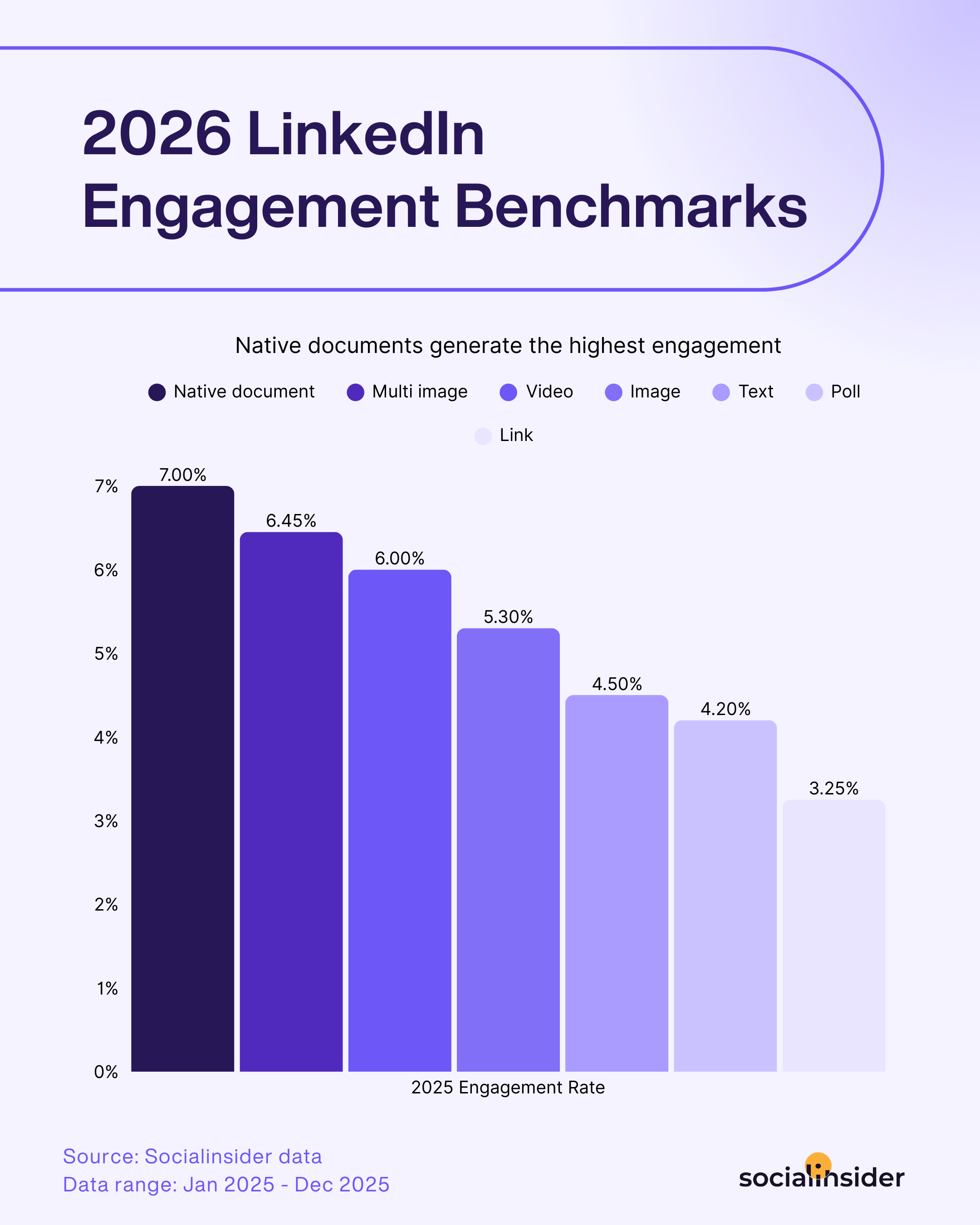
- Strong engagement, slow follower growth → you're retaining and activating the right people, but your content isn't reaching beyond your existing followers. Time to look at format, reach strategy, and whether you're using LinkedIn's distribution levers well.
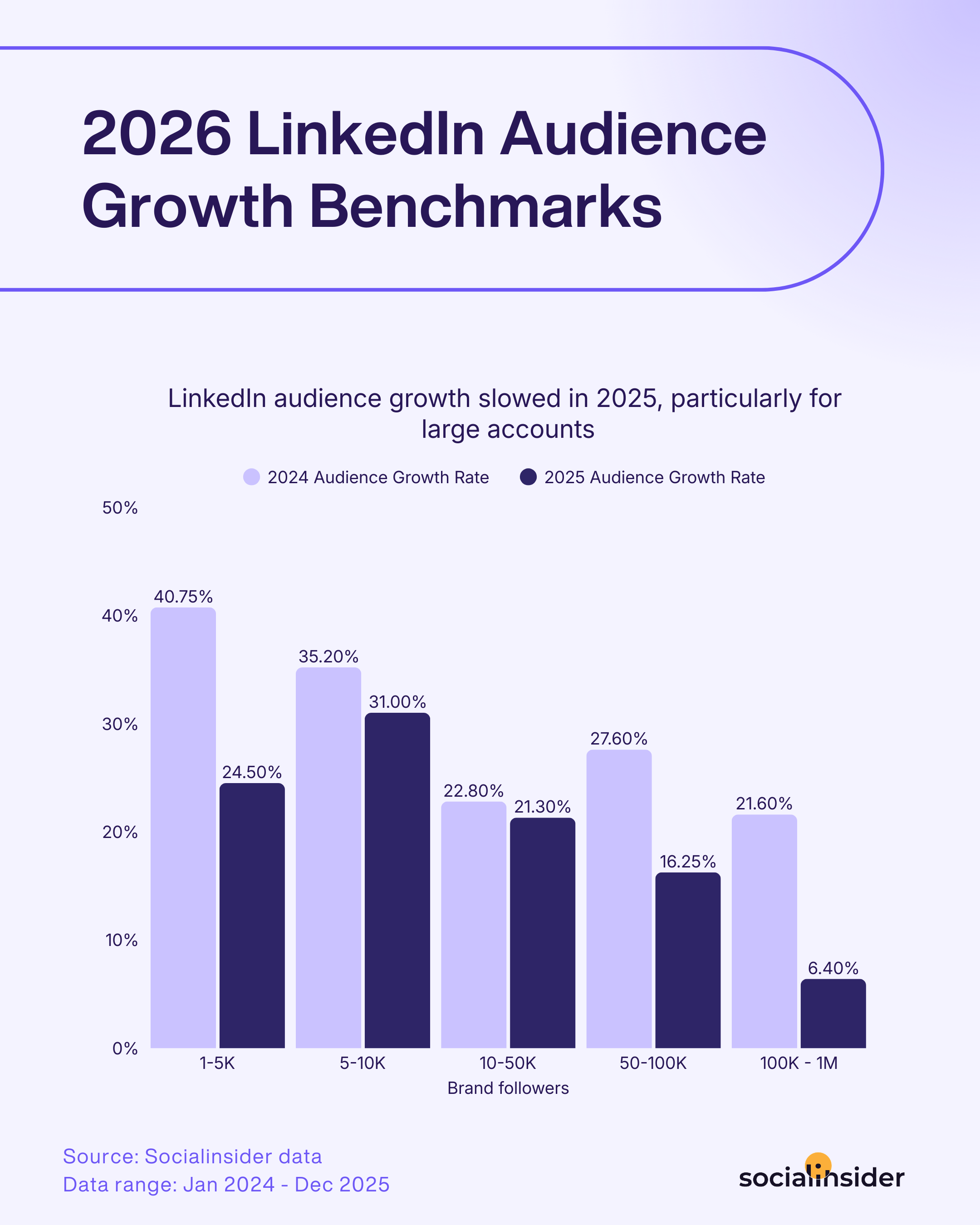
- Good demographics, low seniority → your content is hitting practitioners but not decision-makers. This usually means shifting toward more strategic, business-level content — less "how to do X" and more "why X matters for your business."
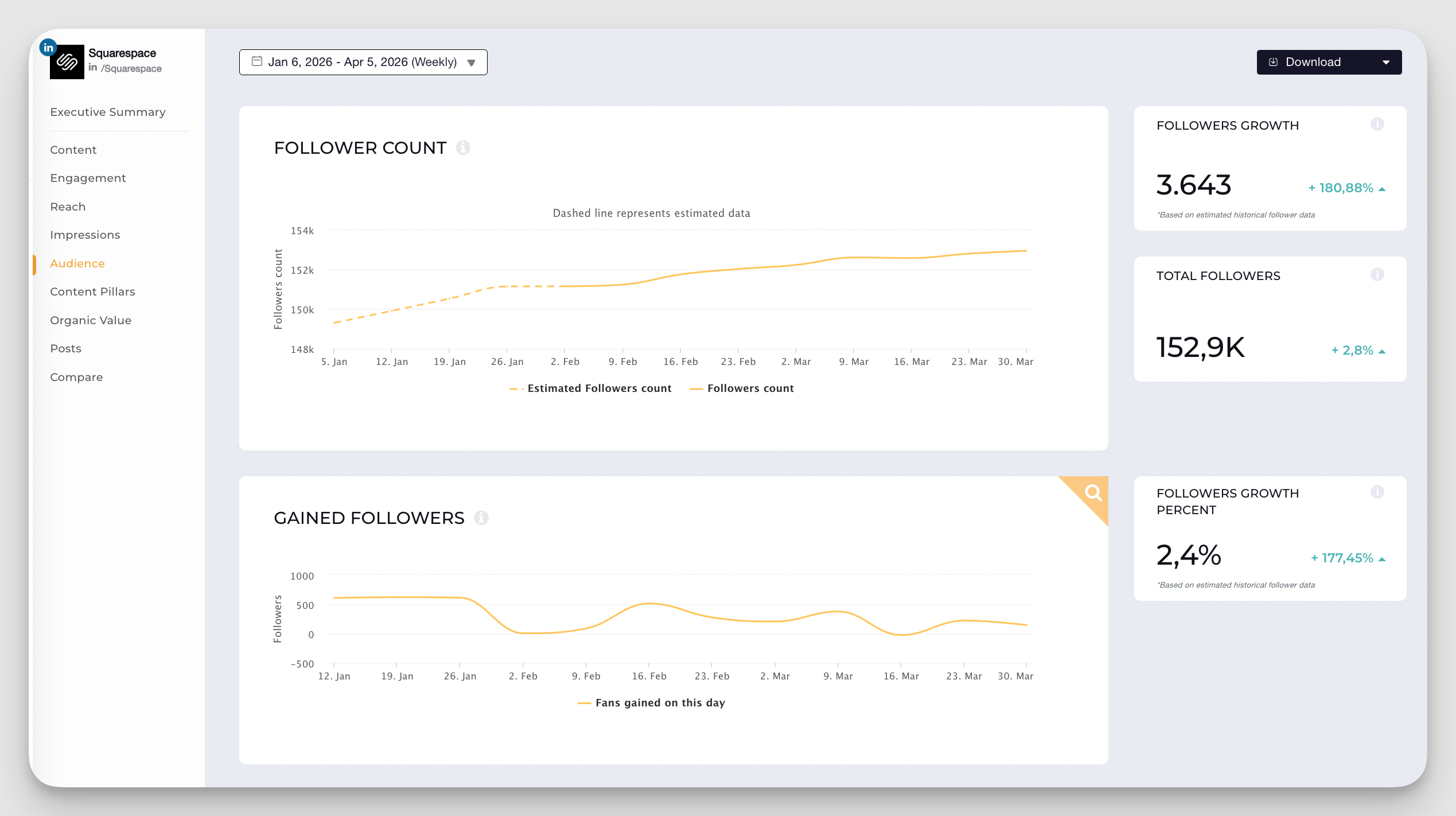
- Follower Growth Trend: Beyond demographics, check the direction of your follower growth over the last 90 days. Consistent growth during a period of active posting is a good sign. Flat or declining growth despite consistent posting is a signal that your content isn't being distributed beyond your existing audience — which means it's time to look at format mix, posting cadence, and topic relevance.
Step 4: Audit your content performance and content pillars
This is my favourite step — because I think it's where the real strategic clarity comes from.
Most teams evaluate their LinkedIn content post by post: this one did well, that one flopped, let's do more of the first kind. And while that's not wrong, it's incomplete. What you actually want to understand isn't which individual posts performed — it's which formats and themes consistently drive engagement. Because themes are what you can build a repeatable strategy around. Individual posts aren't.
I'd suggest going through this step in three stages: format analysis first, then content pillars, then a deep dive into your best-performing posts. Each layer adds a different kind of clarity, and they build on each other.
Start with a post format analysis
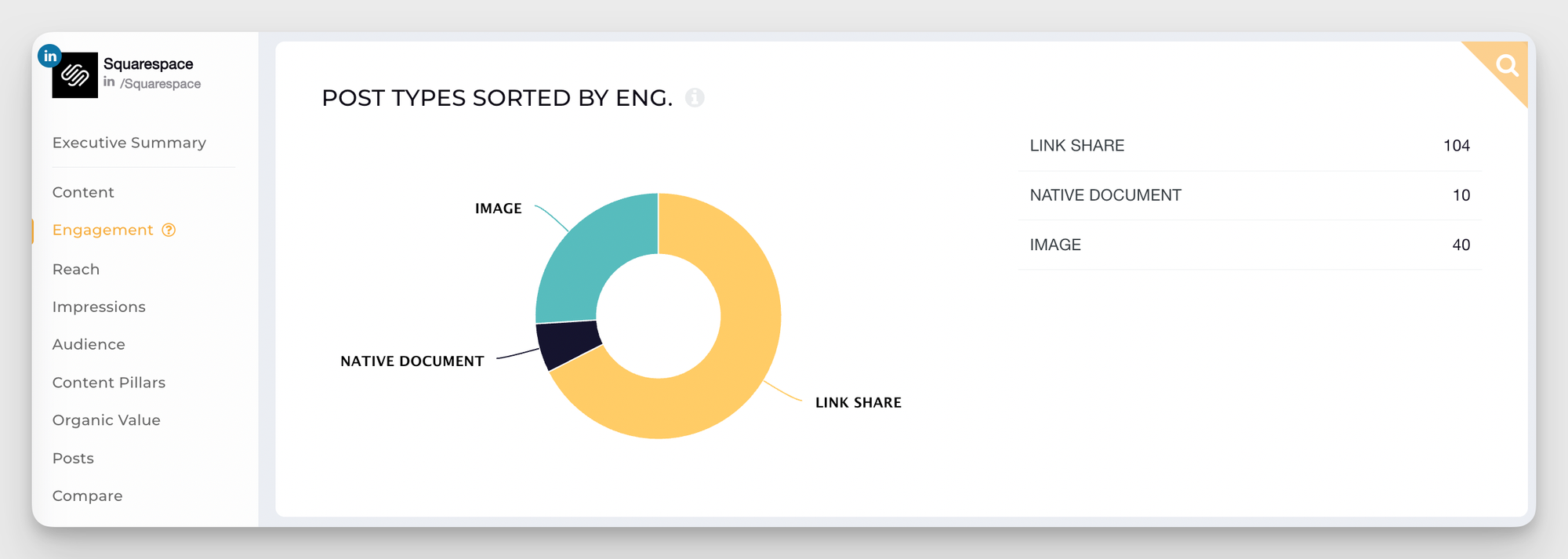
Understanding which content types your audience responds to is the quickest way to improve performance — because you can change formats faster than you can overhaul your content strategy.
This is where Socialinsider makes a step that's usually tedious genuinely fast. Instead of manually exporting CSVs and cross-referencing post types in a spreadsheet, you can see your format performance broken down automatically inside the platform.
Run a content pillars analysis
Format tells you how your content lands. Pillars tell you what your audience actually cares about.
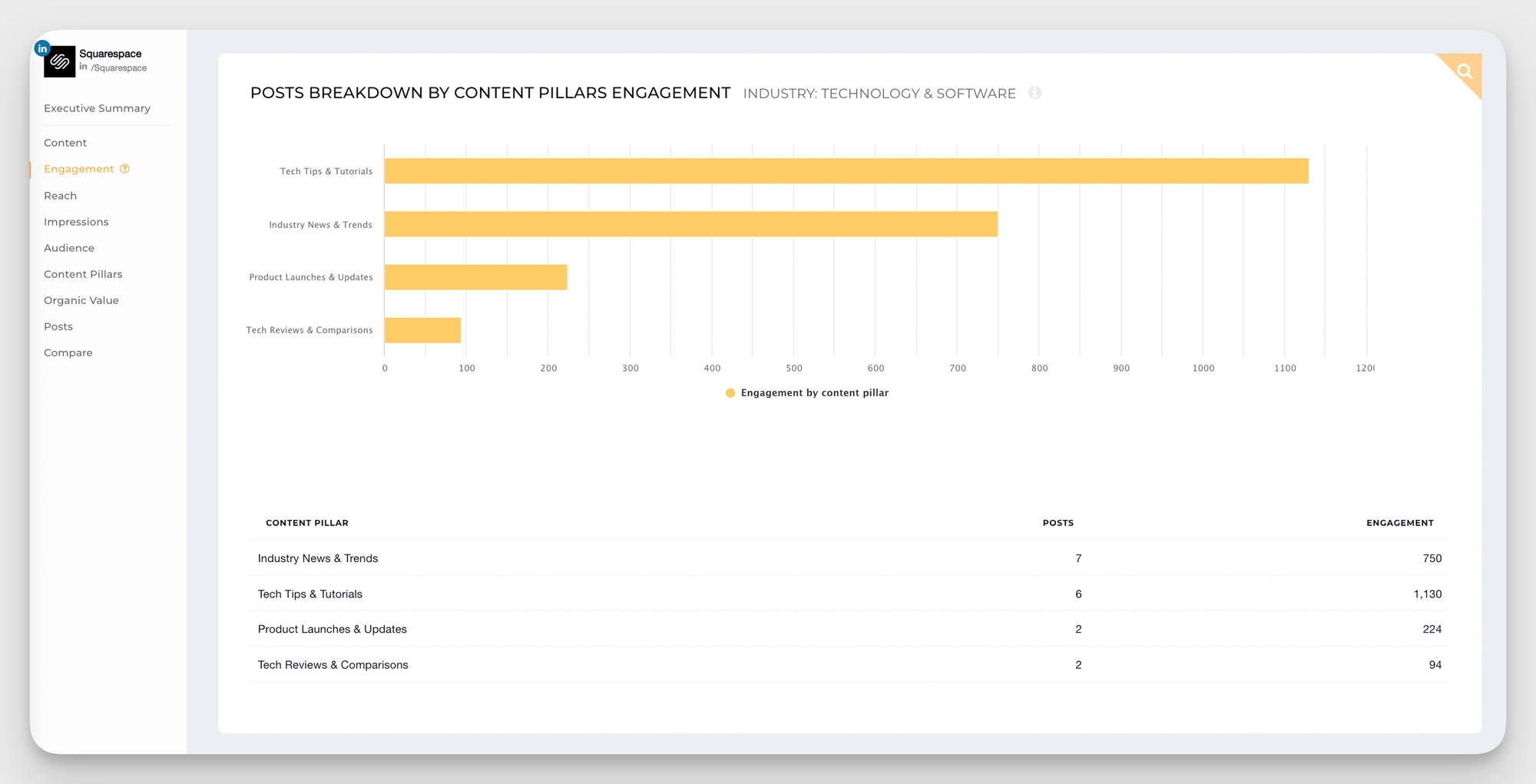
Content pillars are the foundational themes your brand posts around. Instead of evaluating posts one by one, pillar analysis groups them by topic so you can see which themes are consistently driving engagement at a strategic level. It's a different way of reading your content data — and in my experience, a far more useful one for making real decisions about where to invest.
This is where Socialinsider's Content Pillars feature does the heavy lifting.
How to Analyze Content Pillars in Socialinsider:
- Add your LinkedIn profile to Socialinsider
- Navigate to the Content Pillars section from the left-hand menu
- Here you'll have accces to two types of content pillars analysis:
- AI-generated Industry Pillars — automatically built based on your industry, giving you a benchmark for what content themes are resonating broadly across your sector
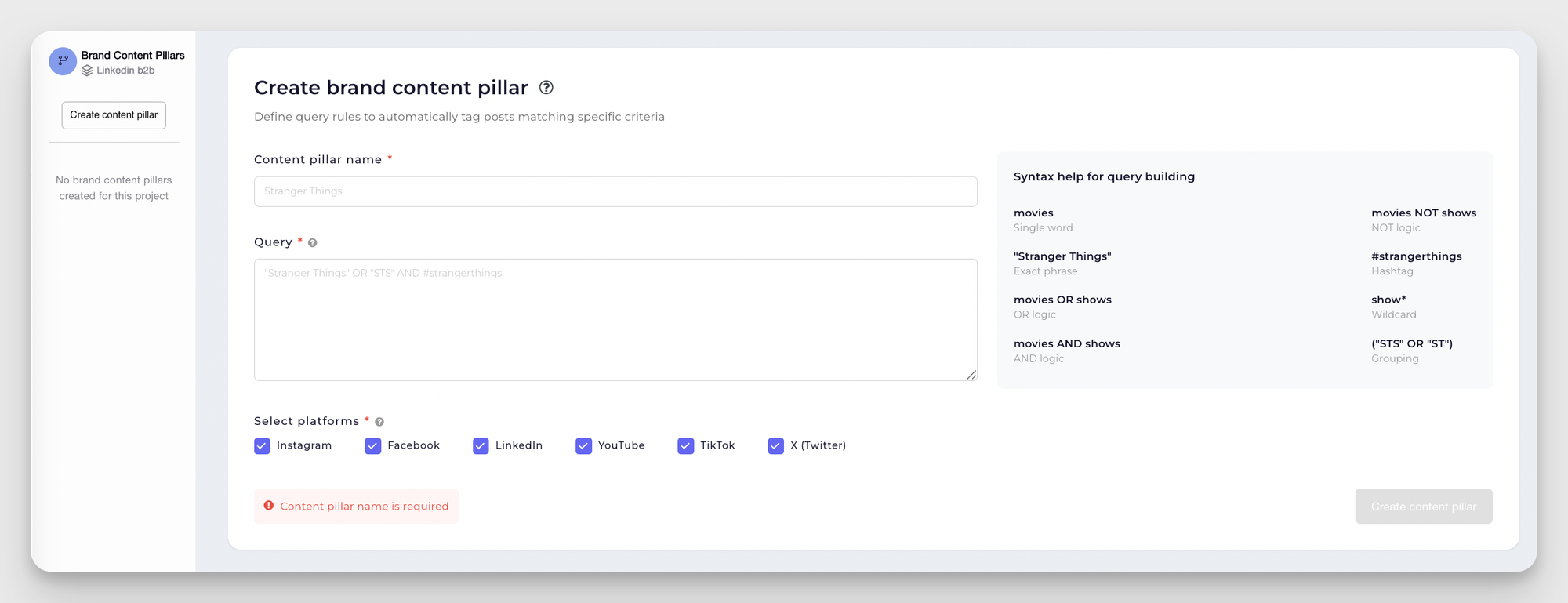
- Brand Pillars — custom themes you define to match your specific strategy, campaigns, or product areas that have to be manually created through the Quey Builder.
Deep dive into your best-performing posts
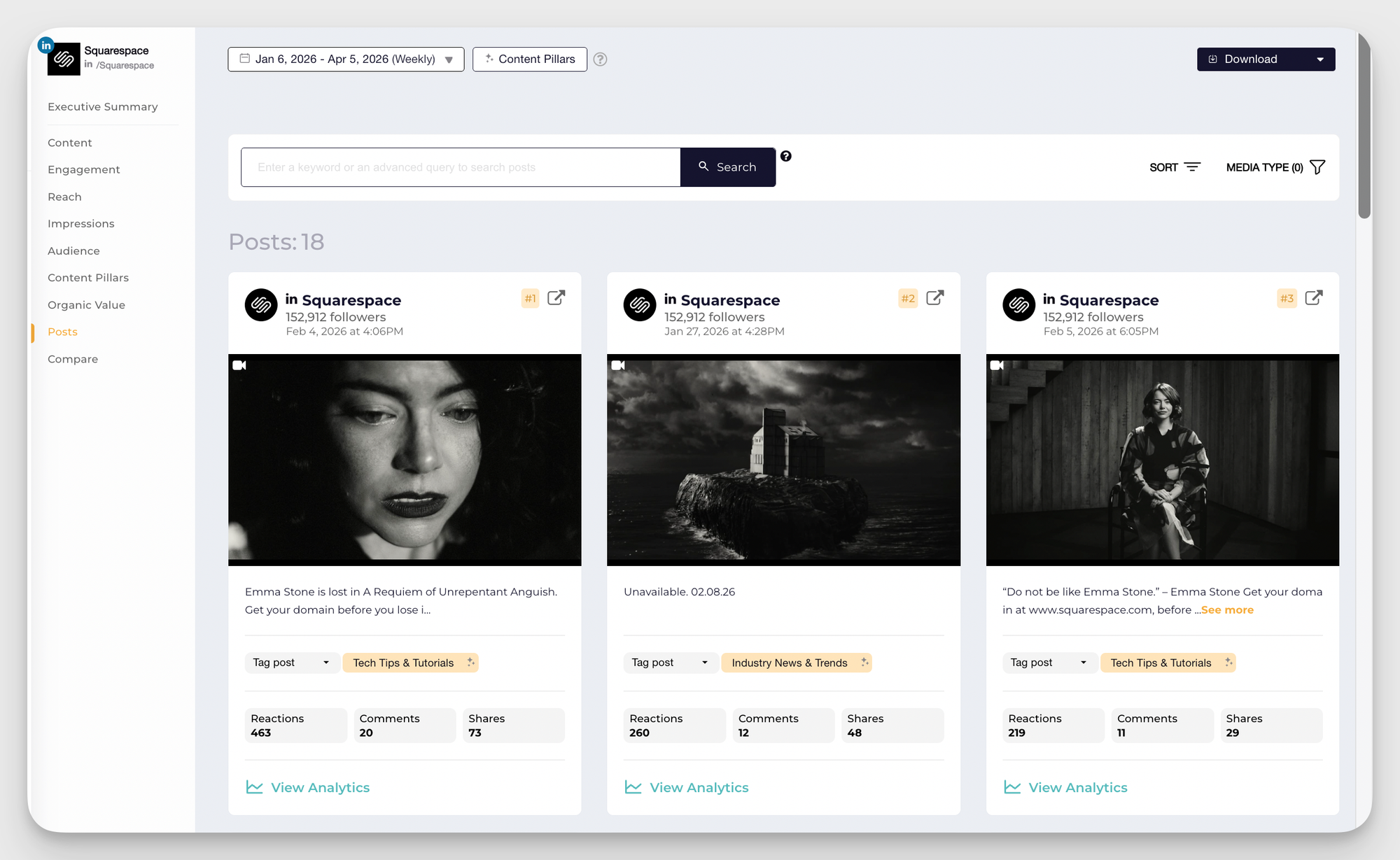
Now that you know which formats and pillars are winning, go one level deeper and look at your actual top posts — not to celebrate them, but to reverse-engineer them.
Pull your top posts by engagement rate from the last 90 days. Before you start looking for patterns, make sure you're working with the right data. For each post, you want to have:
- Impressions — how many people saw the post. This tells you about reach, not resonance.
- Engagement rate — the percentage of people who interacted with the post relative to its reach. This is your primary quality signal, and it's the metric I'd sort by first.
- Likes, comments, and shares — separately, because they tell different stories. Likes are passive. Comments signal that a post made someone think. Shares signal that someone trusted it enough to put their name on it.
- Clicks and CTR — essential if driving traffic was part of the goal for that post. A post with a high engagement rate but near-zero clicks is doing something different than a post that's actively pulling people off LinkedIn.
Once you have that picture for each post, then ask:
- What's the hook? The first one to two lines of a LinkedIn post determine whether anyone reads past them. Look at what your top posts open with. Is there a pattern — a question, a counterintuitive statement, a specific number, a personal observation? If there is, that's a format worth replicating deliberately, not just accidentally.
- What's the comment quality like? Likes are passive. Comments tell you whether a post actually made people think or feel something. Scroll through the comments on your top posts and read them. Are people sharing their own experiences? Asking follow-up questions? Tagging colleagues? That kind of engagement is a much stronger signal of content resonance than a high like count.
- What did you do differently? Sometimes a post outperforms because of the topic, but sometimes it's the format, the timing, the visual, or the way it was phrased. Try to identify at least one specific thing about each top post that you can carry forward deliberately.
Step 5: Measure the Organic Value of your LinkedIn activity
There's a conversation I've had more times than I can count with social media managers — some version of: "I know our LinkedIn content is working, but I can't get leadership to take it seriously."
And when I ask what numbers they're bringing to that conversation, it's usually engagement rate and impressions. Which are meaningful metrics — to us. To a CMO or CFO deciding where to allocate budget, they're abstractions. What leadership wants to know is whether LinkedIn is worth the investment. And the only way to answer that in a language they respond to is with a number that connects to money.
That's what Organic Value does.
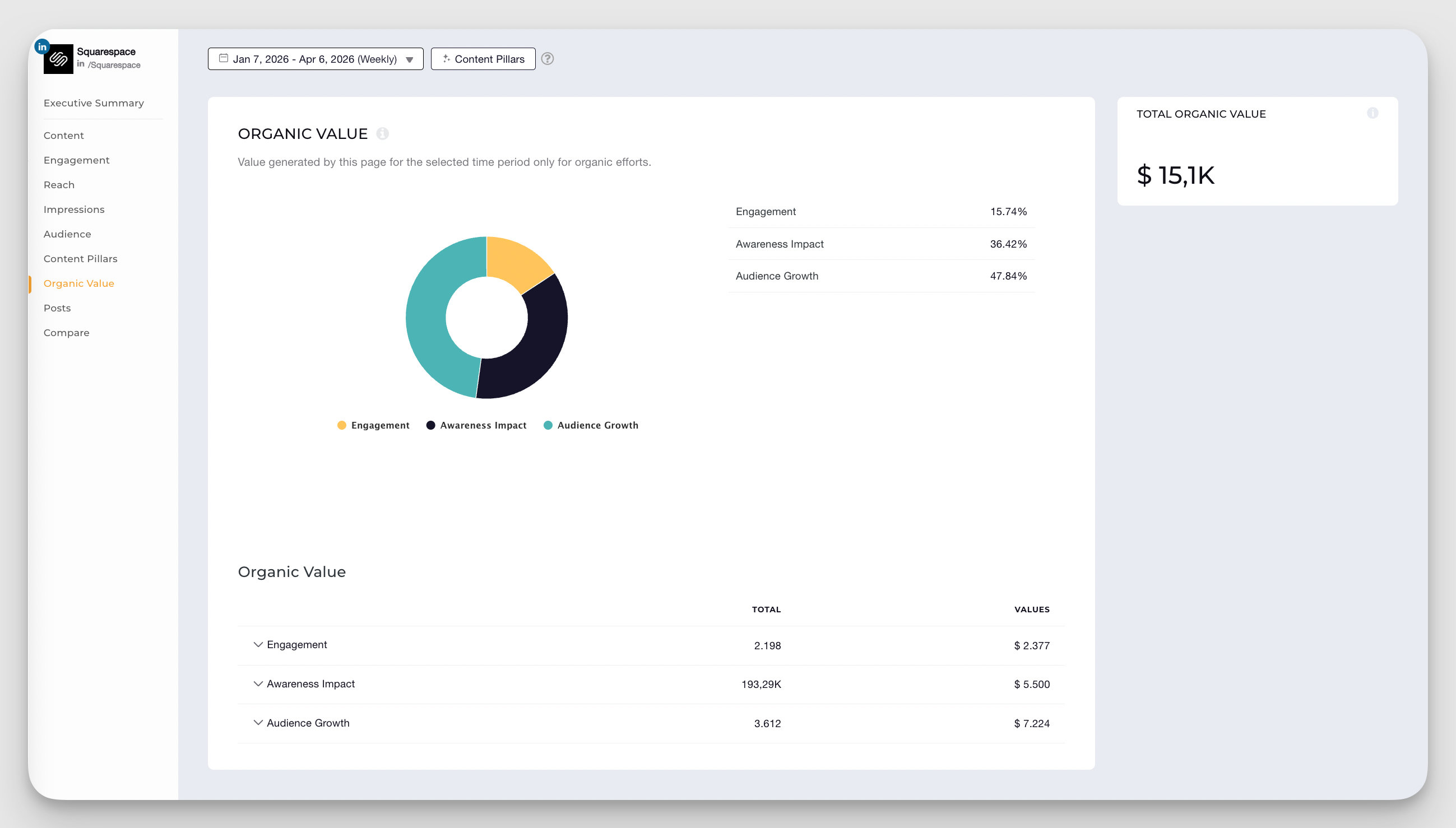
Organic Value translates your unpaid LinkedIn activity into a monetary equivalent — specifically, what it would have cost to achieve the same reach, engagement, and clicks through paid LinkedIn campaigns.
Organic Value translates your unpaid LinkedIn activity into a monetary equivalent — specifically, what it would have cost to achieve the same reach, engagement, and clicks through paid LinkedIn campaigns.
It's not a vanity metric. It's a business case metric. When you can say "our organic LinkedIn content delivered €14,000 in equivalent ad value last quarter," that lands in a budget conversation in a way that "our engagement rate was 3.2%" simply doesn't. It also gives you a way to track the efficiency of your organic strategy over time — and to make smarter decisions about where paid amplification actually adds value versus where organic is already doing the job.
How to measure organic value in Socialinsider?
- Add your LinkedIn profile to the Socialinsider dashboard
- In the Home section, go to Settings and click Organic Value Configuration
- Select LinkedIn as the platform and click Configure Value
- Assign a monetary value to each metric — reach, engagement, clicks — based on your industry benchmarks or your typical CPM/CPC rates
- From the left-hand menu, navigate to your LinkedIn profile, then click on Organic Value
You'll see the total calculated Organic Value for the selected period, broken down by metric so you can see exactly where the value is coming from.
Final thoughts
Running a LinkedIn audit isn’t just a box to tick—it’s a way to make sure the time and effort you’re putting into the platform actually pay off. By stepping back and looking at your goals, your content pillars, your audience, and even the organic value of your posts, you get a clearer picture of what’s working and what needs a tweak.
Think of it as hitting refresh on your strategy: you drop what doesn’t serve you, double down on what does, and walk away with a LinkedIn presence that feels intentional and effective. And the best part? With the right tools, it doesn’t have to be complicated—it just has to be consistent.
FAQs about LinkedIn audit
How do I know if my LinkedIn content strategy is working?
Look beyond vanity metrics. A LinkedIn content strategy is working when your engagement rate is at or above industry benchmarks, your audience demographics match your ICP, your follower growth is consistent, your Organic Value is trending upward, and your content is generating the downstream outcomes tied to your primary goal. A quarterly LinkedIn audit is the structured way to answer that question — with data, not instinct.
What is the best LinkedIn audit tool?
For basic data, LinkedIn's native analytics is a free starting point. For anything more structured — content pillar analysis, Organic Value calculation, cross-channel measurement — Socialinsider is the tool I'd recommend. It's purpose-built for this type of analysis and covers all the areas where native analytics fall short.
How do I prove the ROI of LinkedIn to leadership?
The most effective way is through Organic Value — a metric that calculates the monetary equivalent of your unpaid LinkedIn activity based on what it would have cost to achieve the same results through paid campaigns. Socialinsider's Organic Value feature does this automatically once you configure your industry benchmarks. Pair it with a clear quarter-over-quarter trend and a comparison against your paid LinkedIn costs, and you have a business case that makes sense outside of a social media context.
Elena Cucu
Content & SEO Manager @ Socialinsider with 8 years of experience in marketing. I like to describe myself as a social butterfly with a curious mind, passionate about dancing and psychology.

Know what your competitors do — before your manager asks
Get instant social benchmarks & reports without manual work.
You might also like




Improve your social media strategy with Socialinsider!
Use in-depth data to measure your social accounts’ performance, analyze competitors, and gain insights to improve your strategy.